
SEO KPIs help you understand whether your organic search strategy is actually working. Instead of guessing why traffic changed, which pages bring in SEO leads, or whether your rankings are improving, the right KPIs give you clear data to work with.
But not every SEO metric deserves a spot in your report. Tracking too many numbers can make it harder to see what really matters.
In this guide, we’ll look at the most important SEO KPIs to track, from organic traffic and keyword rankings to conversions, technical performance, and AI search visibility.
What are SEO KPIs?
SEO KPIs are measurable values that show how well your SEO efforts are performing. They help you track things like organic traffic, keyword rankings, conversions, and revenue from search.
The main difference between a regular metric and an SEO KPI is that a KPI is tied to a specific goal.
For example, page views are just a metric. But if your goal is to generate more leads, then organic form submissions or demo requests would be a more useful SEO KPI.
Why Tracking SEO KPIs Matter
Tracking SEO KPIs helps you understand what is working, what is not, and where to focus your time.
Without KPIs, SEO can quickly become guesswork and you could get distracted by tasks that aren't as important.
You might publish content, build links, or fix technical issues, but you will not know whether those efforts are actually improving traffic, rankings, leads, or revenue.
Here are a few reasons SEO KPI tracking matters:
- Proving ROI: KPIs like organic conversions, leads, and revenue help show whether your SEO work is contributing to business growth.
- Identifying growth opportunities: Tracking rankings, impressions, and landing page performance can help you spot pages that are close to performing well but need a few updates to move higher in search results.
- Adapting to search trends: Search results change all the time. By monitoring KPIs like click-through rate, impressions, and AI search visibility, you can see when your performance shifts and adjust your strategy.
- Improving user experience: Engagement metrics can show when visitors are leaving a page too quickly or not taking action. This helps you decide whether to improve the content, page speed, layout, or calls to action.
Essential SEO KPIs to Track
- Organic traffic
- Organic conversions
- Keyword rankings
- Organic impressions
- Organic clicks
- Backlinks
- Referring domains
- SEO Return on Investment (ROI)
- AI Overviews and AI Search Visibility
Let's take a closer look at each of these SEO KPIs in more detail.
1. Organic Traffic
Organic traffic refers to the visitors who land on your website from unpaid search results.
This is one of the most important SEO KPIs to track because it shows whether your website is becoming more visible in search engines. If your organic traffic is increasing, it usually means more people are finding your pages through Google and other search engines.
That said, organic traffic should not be viewed on its own. A spike in traffic is great, but it only matters if those visitors are relevant and taking meaningful actions on your site.
How to track organic traffic
The easiest way to track organic traffic is with Google Analytics 4.
To find it in GA4:
- Go to Reports
- Click Acquisition
- Select Traffic acquisition
- Look for the row labeled Organic Search
- Review metrics like sessions, engaged sessions, engagement rate, and conversions
You can change the date range to compare performance month over month or year over year.
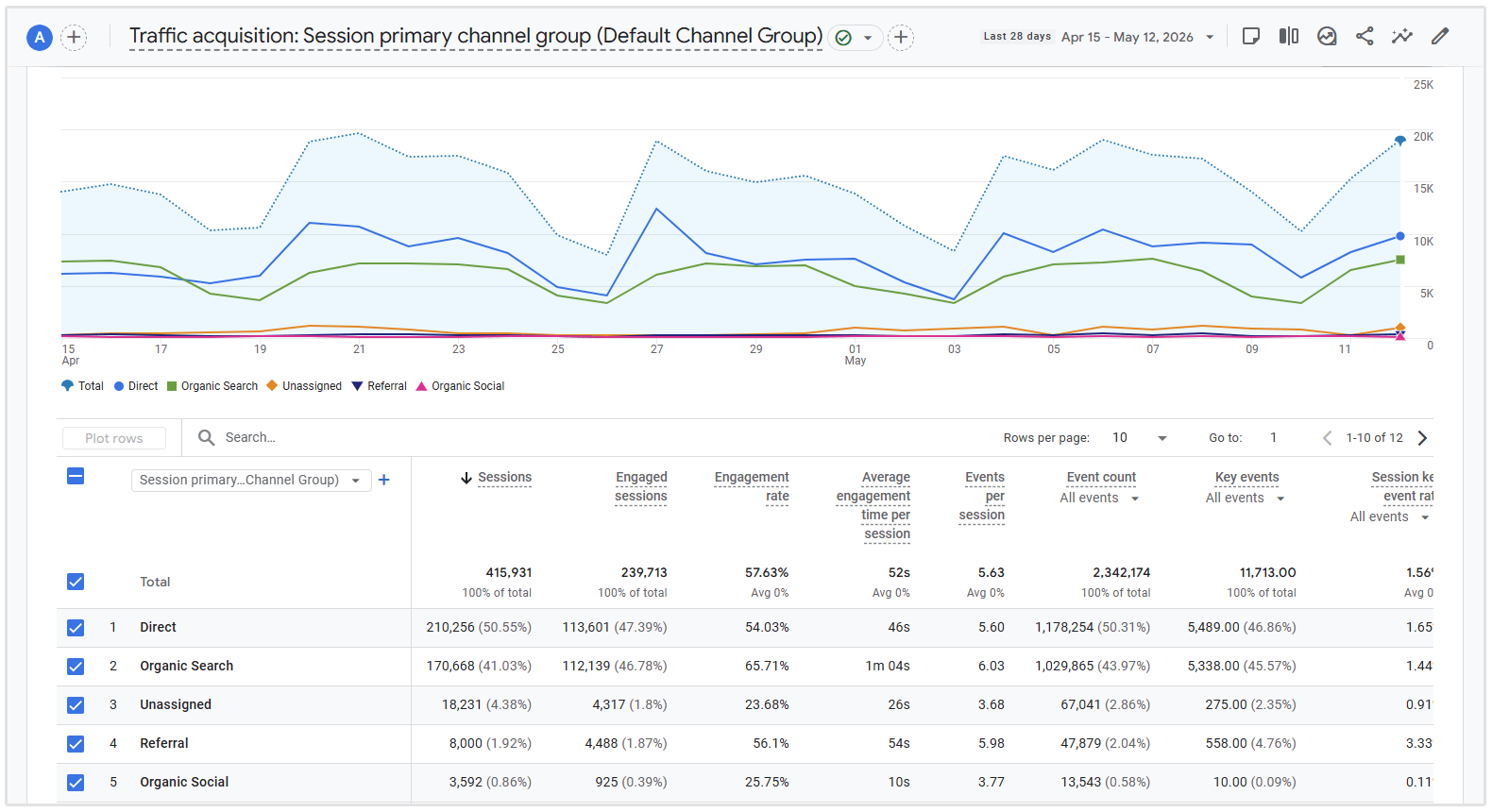
You can also hover over the Organic Search line in the graph to see how your organic traffic changed over your selected time period.
To focus only on organic traffic, select the checkbox next to Organic Search in GA4, then click Plot rows.
This will isolate organic search in the graph, making it easier to see how your organic traffic changed over your selected date range.
For a clearer picture, look beyond total sessions. Pay attention to engaged sessions, which show visits where users stayed on your site for longer, viewed more than one page, or completed an important action.
This helps you understand not just how much organic traffic you are getting, but whether that traffic is actually useful.
Related Reading: 10 Ways to Increase Organic Traffic to Your Website
2. Organic Conversions
Organic conversions happen when someone visits your website from an unpaid search result and completes an important action.
This could include:
- Buying a product
- Filling out a contact form
- Booking a demo
- Calling your business
- Downloading a resource
- Signing up for your newsletter
This is one of the most valuable SEO KPIs because it shows whether your organic traffic is turning into real business results.
Getting more visitors is great, but if those visitors are not taking action, your SEO strategy may need to be adjusted.
For example, a blog post might bring in thousands of visitors, but very few leads. Meanwhile, a service page with lower traffic might generate more enquiries because it attracts people who are ready to take action.
How to track organic conversions
You can track organic conversions in Google Analytics 4 by setting up key events.
To track them in GA4:
- Go to Admin
- Under Data display, click Events
- Mark important actions as Key events
- Examples could include form submissions, purchases, phone clicks, newsletter signups, or demo requests
- Then go to Reports
- Click Acquisition
- Select Traffic acquisition
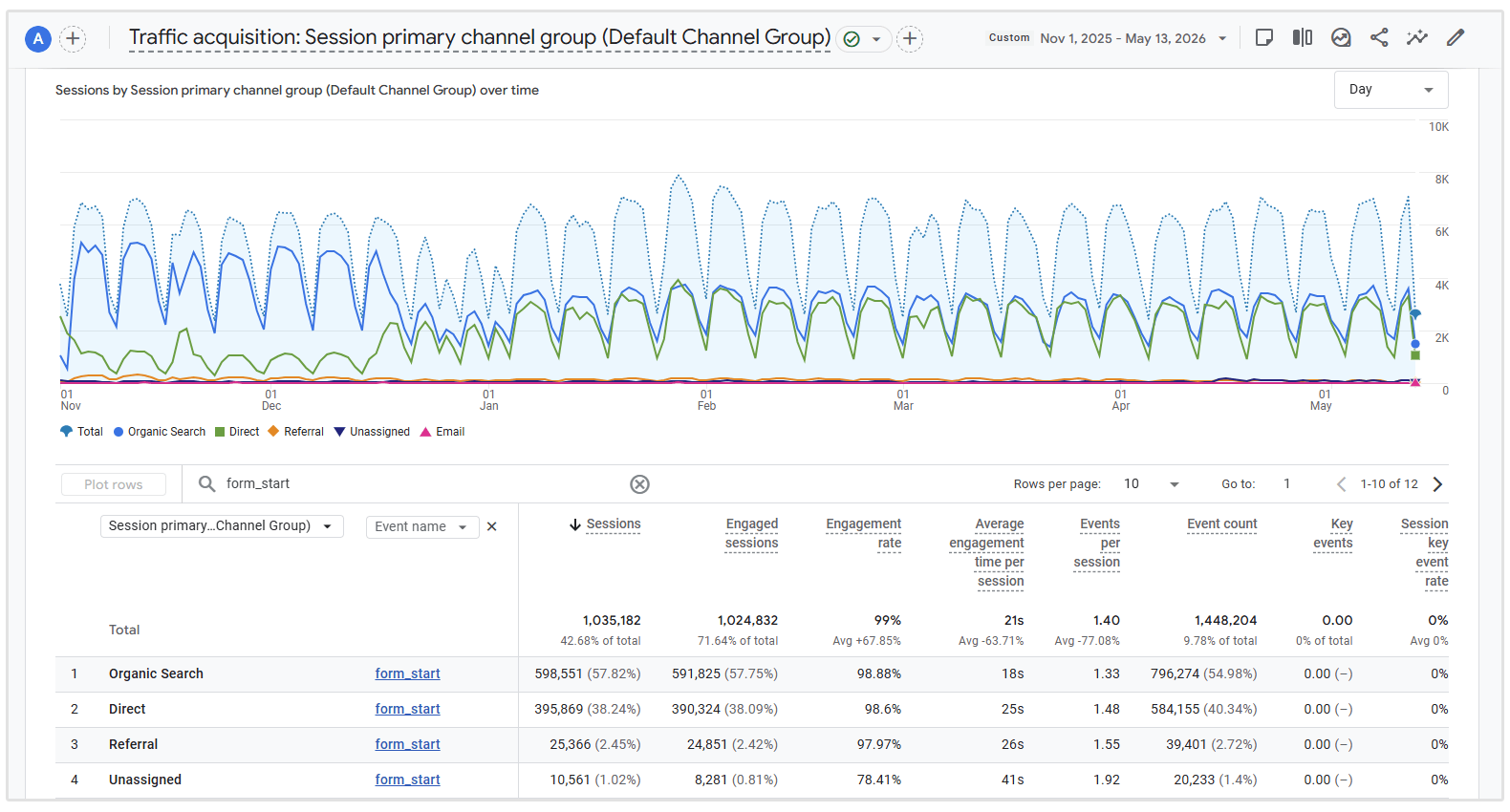
- In the table, add Event name as a secondary dimension
- Use the search bar above the table to search for the event you want to view, such as sign_up, generate_lead, or form_submit
- Once the event is filtered, look for the Organic Search row
- Review how many key events came from organic traffic
For instance, check the below screenshot where I added a filter to view our event "form_start" which triggers when a visitor starts to complete our registration form.
You can also check which pages are driving conversions by going to:
Reports > Engagement > Landing page
Then add or filter by organic search traffic.
This helps you see which SEO pages are not just bringing in visitors, but actually helping generate leads, sales, or other valuable actions.
3. Keyword Rankings
Keyword rankings show where your website appears in search results for specific keywords.
This is an important SEO KPI because it helps you understand whether your pages are becoming more visible for the keywords that matter to your business. If your rankings improve, it often leads to more impressions, more clicks, and more organic traffic.
That said, rankings should not be tracked in isolation.
A keyword might rank well but bring in very little traffic or no conversions. That is why it is useful to track rankings alongside organic clicks, CTR, and conversions.
How to track keyword rankings
You can use SEOptimer’s Keyword Rank Tracker to monitor your keyword positions over time.
SEOptimer lets you track keyword rankings across Google and Bing, as well as on desktop and/or mobile devices.
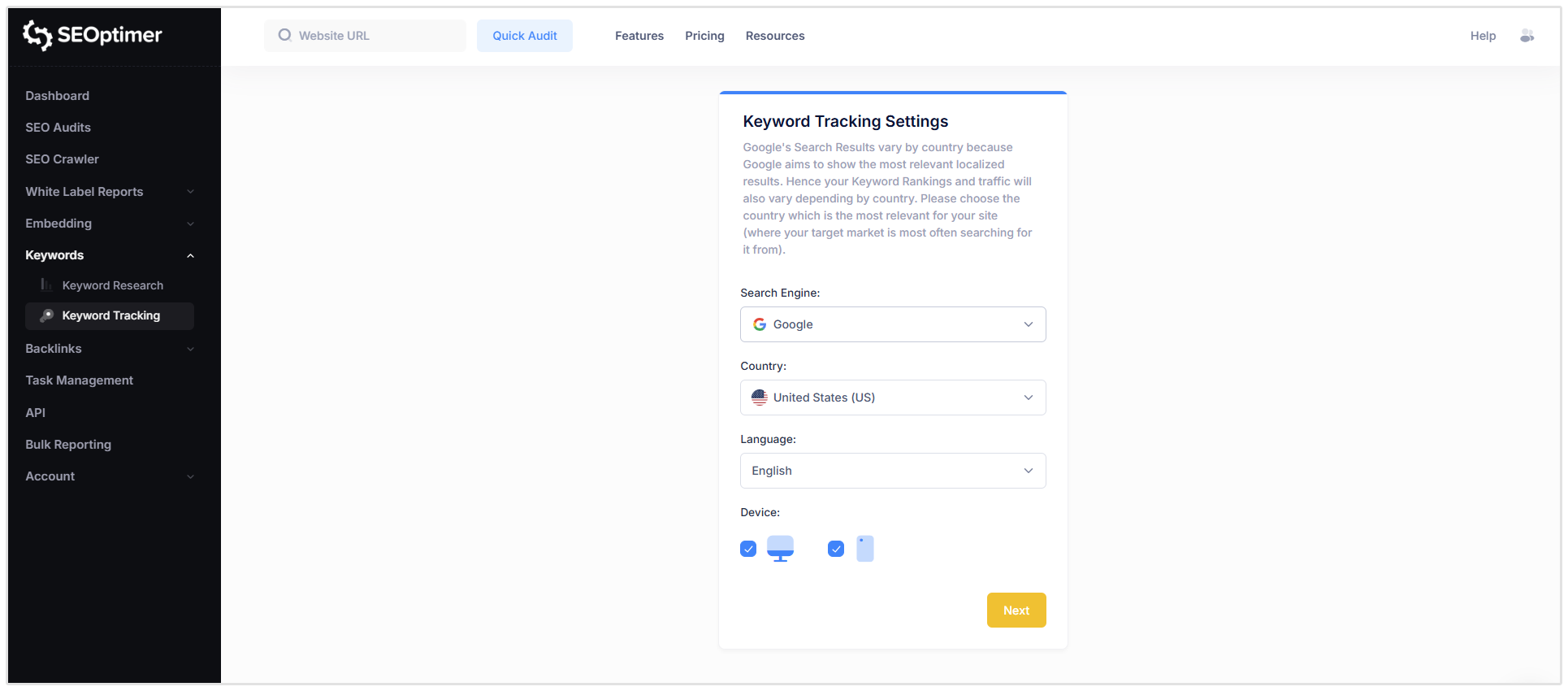
This is useful because rankings can change depending on the search engine, device type, and location.
SEOptimer also supports rank tracking across multiple countries, which is helpful if you target different regions or manage SEO for clients in different markets.
To set up keyword tracking in SEOptimer:
- Log in to your SEOptimer account.
- Go to the Keyword Tracking section.
- Add your website or the client website you want to track and click Track Keywords.
- Choose your tracking settings, including the target country, language, search engine, and device type.
- Enter the keywords you want to monitor.
- You can also use SEOptimer’s keyword suggestions to find relevant keywords your site already ranks for.
- Review your rankings to see how your keyword positions change over time.
Once your keywords are added, SEOptimer will show ranking changes over time, which pages are ranking, and how much traffic those keywords may be delivering.
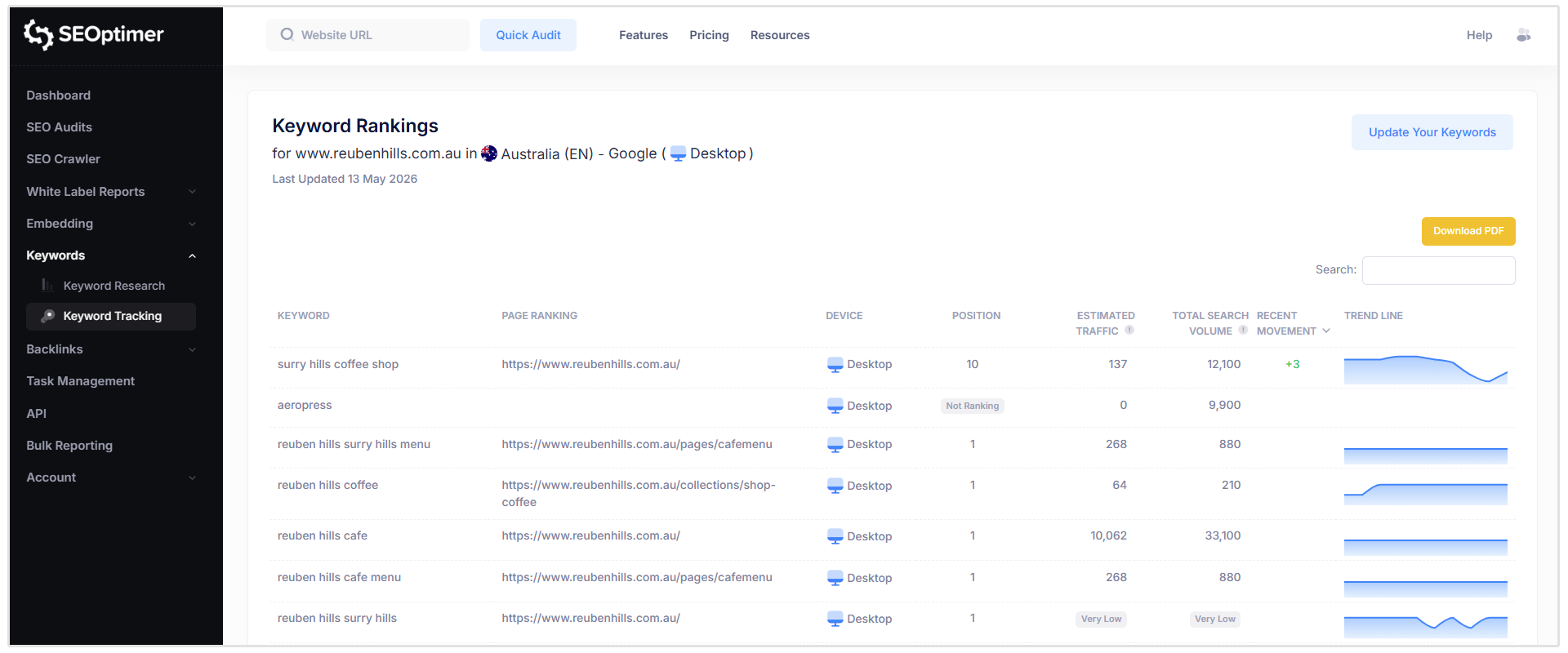
You can also export ranking data to CSV, Excel, or PDF, which is useful for reporting to clients or stakeholders.
A good way to use this data is to look for keywords that are close to ranking on the first page.
These are often keywords in positions 11 to 20.
With a few content updates, stronger internal links, or better on-page optimization, you may be able to push those pages onto page one and increase organic traffic.
4. Organic Impressions
Organic impressions show how often your website appears in search results.
This does not mean someone clicked on your page. It simply means your page was shown to a user in the search results for a specific query.
This KPI is helpful for spotting areas for improvement.
If a page gets a lot of impressions but very few clicks, your title tag or meta description may not be strong enough to encourage people to click.
How to check organic impressions
You can check organic impressions in Google Search Console.
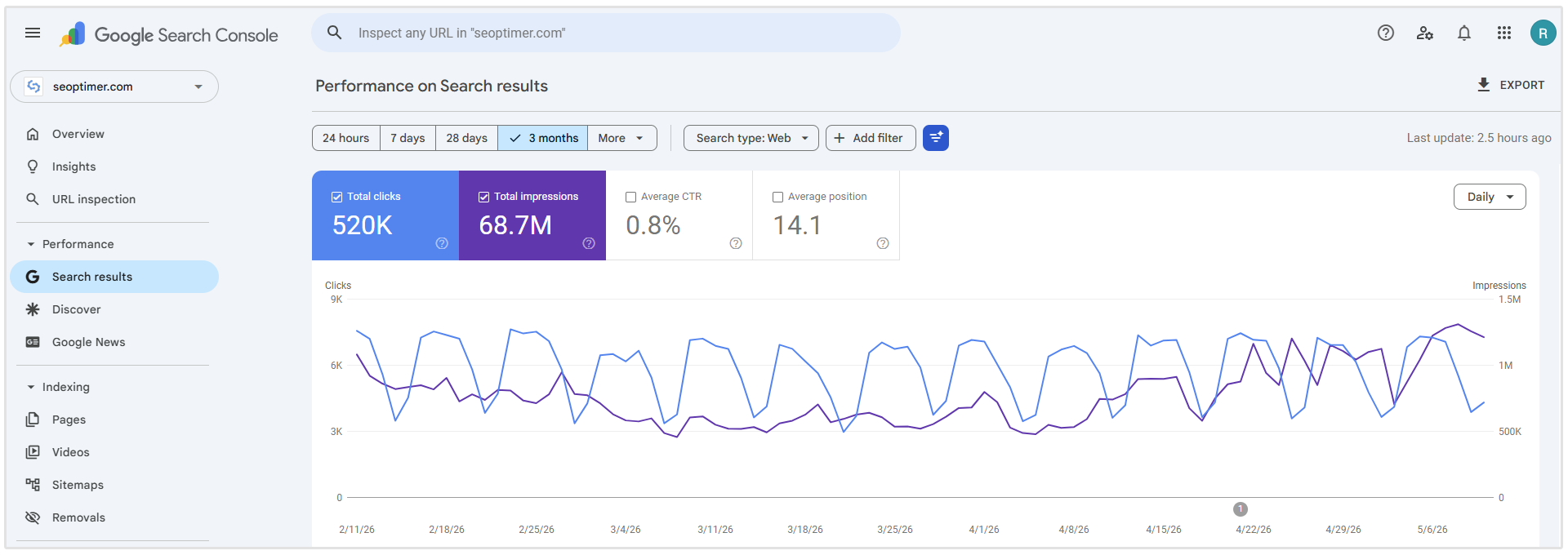
To find them:
- Open Google Search Console
- Select your website property
- Go to Performance
- Click Search results
- Make sure Total impressions is selected
- Review impressions by query, page, country, device, or search appearance
A useful way to analyze impressions is to compare them with clicks and CTR.
For example, if a page has high impressions but low clicks, it may be worth updating the title tag and meta description to make the result more relevant and appealing.
If impressions are growing over time, it usually means your content is becoming more visible in search, even if traffic has not increased yet.
5. Organic Clicks
Organic clicks show how many times users clicked on your website from unpaid search results.
This is slightly different from organic traffic in GA4.
Google Search Console tracks clicks from the search results, while GA4 tracks what happens once users land on your website.
Organic clicks are important because they show whether your search visibility is actually turning into visits. A page may appear in search results often, but if users are not clicking, your title tag, meta description, or search intent alignment may need work.
How to check organic clicks
You can view organic clicks in Google Search Console.
To find them:
- Open Google Search Console
- Select your website property
- Go to Performance
- Click Search results
- Make sure Total clicks is selected
- Review clicks by query, page, country, device, or search appearance
6. Backlinks
Backlinks are links from other websites that point to your website.
They are an important SEO KPI because they help show whether your site is gaining authority over time.
When relevant, trustworthy websites link to your content, it can improve your chances of ranking for competitive keywords.
But with backlinks, quality matters more than quantity. A few strong links from relevant websites are usually far more valuable than hundreds of low-quality links from spammy directories.
You should track backlinks to see:
- How many new links your site is gaining
- Which links you have lost
- Which pages are earning the most links
- Which websites are linking to you
- Whether your backlinks are dofollow or nofollow
- What anchor text other sites are using
- How your backlink profile compares to competitors
How to track backlinks with SEOptimer
There are two ways to check backlinks in SEOptimer: Backlink Monitoring and Backlink Research.
Use Backlink Monitoring when you want to track backlink changes over time.
This is useful for seeing new and lost backlinks, monitoring competitor links, and you can also get email alerts when your backlink profile changes.
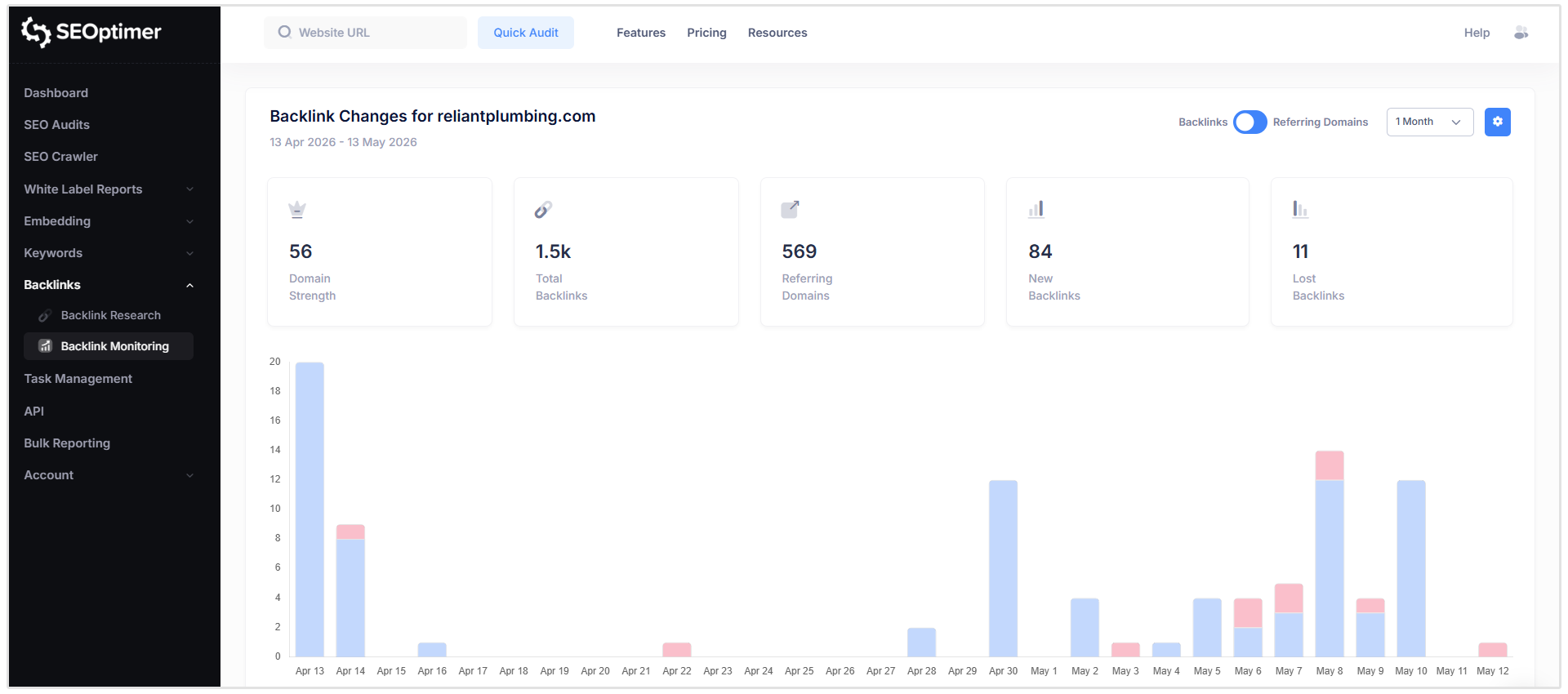
SEOptimer’s Backlink Monitoring tool lets you view changes by backlinks or referring domains, review changes over weekly, monthly, quarterly, or yearly periods, and schedule weekly or monthly email summaries.
To set up Backlink Monitoring in SEOptimer:
- Log in to your SEOptimer account.
- Click Backlink Monitoring in the left-hand menu.
- Add your website URL.
- Choose whether you want weekly, monthly, or no email alerts.
- Click Add Website.
- Open the website in your Backlink Monitoring dashboard.
- Here you can review key metrics like Domain Strength, Total Backlinks, Referring Domains, New Backlinks, and Lost Backlinks.
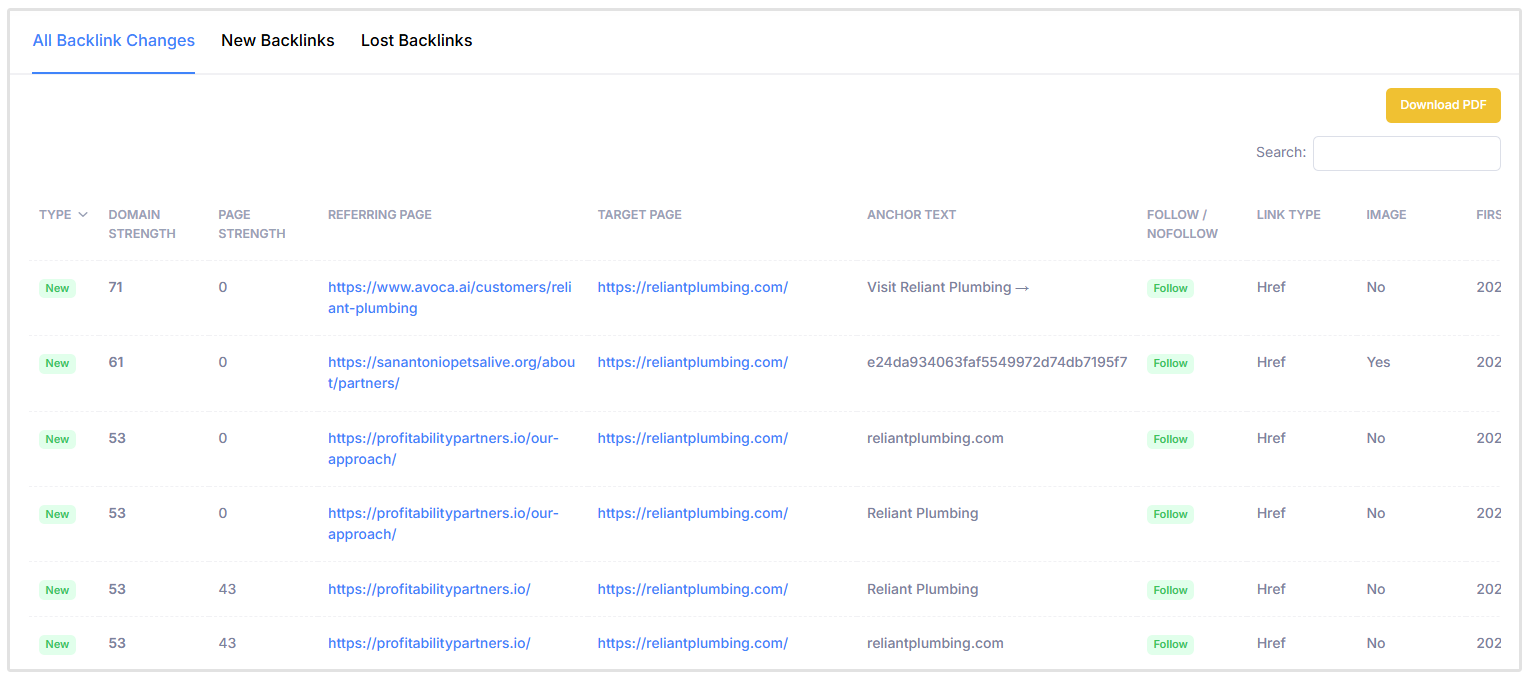
Use Backlink Research when you want to check the backlink profile of any domain or URL, including your own website, a client’s website, or a competitor’s site.
SEOptimer’s Backlink Research tool gives you an overview of referring domains, backlinks, Domain Strength, Page Strength, IPs, and subnets.
It also lets you review individual backlinks, anchor text, dofollow/nofollow status, top pages, TLDs, and backlink countries.
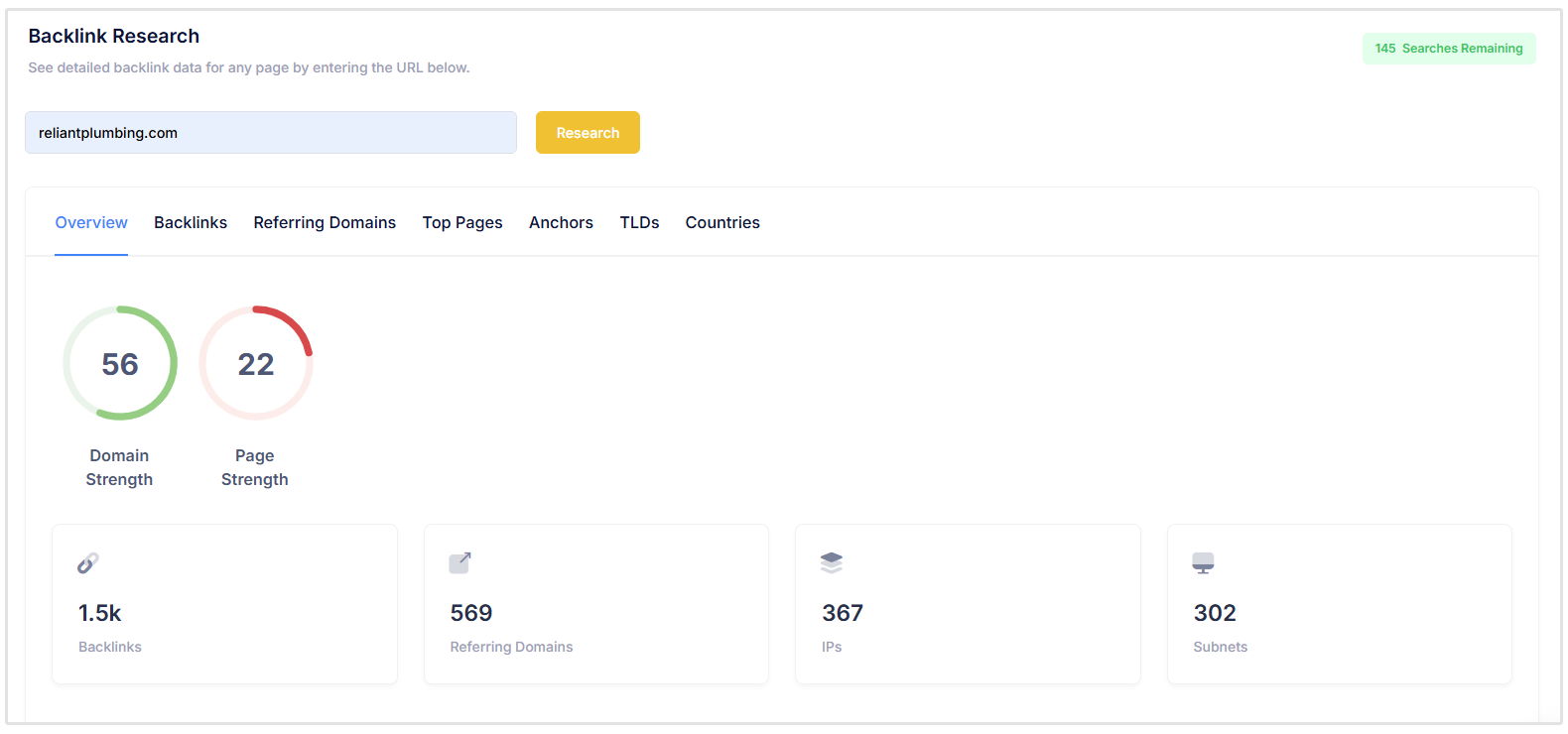
To use Backlink Research in SEOptimer:
- Log in to your SEOptimer account.
- Click Backlink Research in the left-hand menu.
- Enter the domain or URL you want to analyze.
- Review the Overview tab for high-level backlink metrics.
- Use the Backlinks tab to inspect individual links.
- Check the other tabs to better understand your entire link profile.
For regular SEO reporting, Backlink Monitoring is best for keeping an eye on changes. Backlink Research is better when you want a deeper look at your own backlink profile or want to compare it against competitors.
7. Referring Domains
Referring domains are the unique websites that link to your site.
This is different from backlinks. A backlink is a single link, while a referring domain is the website that link comes from. So, if one website links to your site 10 times, that counts as 10 backlinks but only one referring domain.
Referring domains are an important SEO KPI because they give you a better picture of your backlink profile’s diversity and strength. In general, earning links from multiple relevant, trusted websites is more valuable than getting many links from the same site.
For example, 50 backlinks from 50 different quality websites usually show stronger authority than 50 backlinks from one website.
You should track referring domains to see:
- How many unique websites are linking to you
- Whether your referring domains are increasing over time
- Which websites are sending links to your site
- Which pages attract the most referring domains
- How your referring domains compare to competitors
How to track referring domains
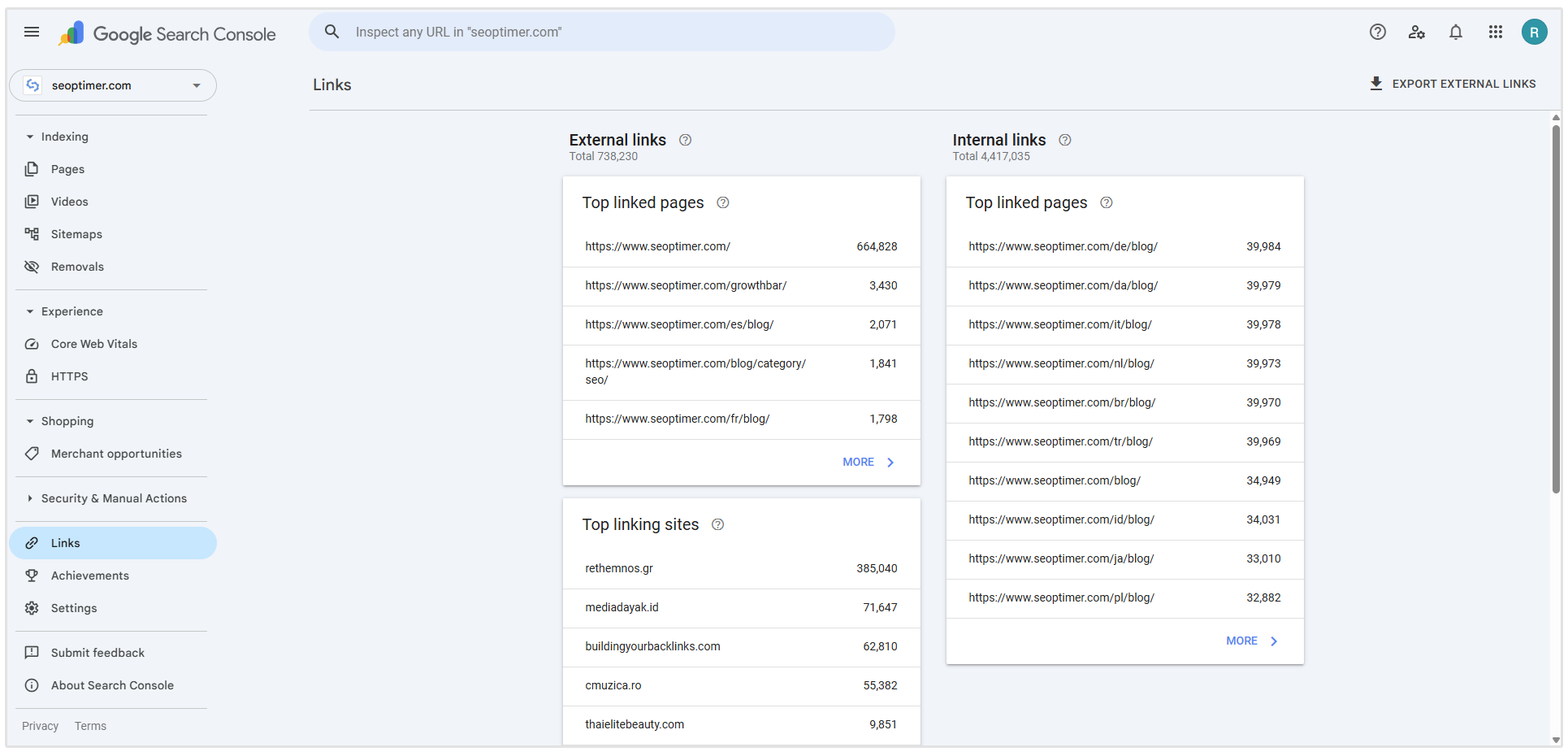
You can get a basic view of referring domains in Google Search Console by going to the Links report and checking Top linking sites.
This shows which domains link to your website most often.
For a more detailed view, you can use SEOptimer’s Backlink Research tool to check referring domains for your own site, a client’s site, or a competitor’s site.
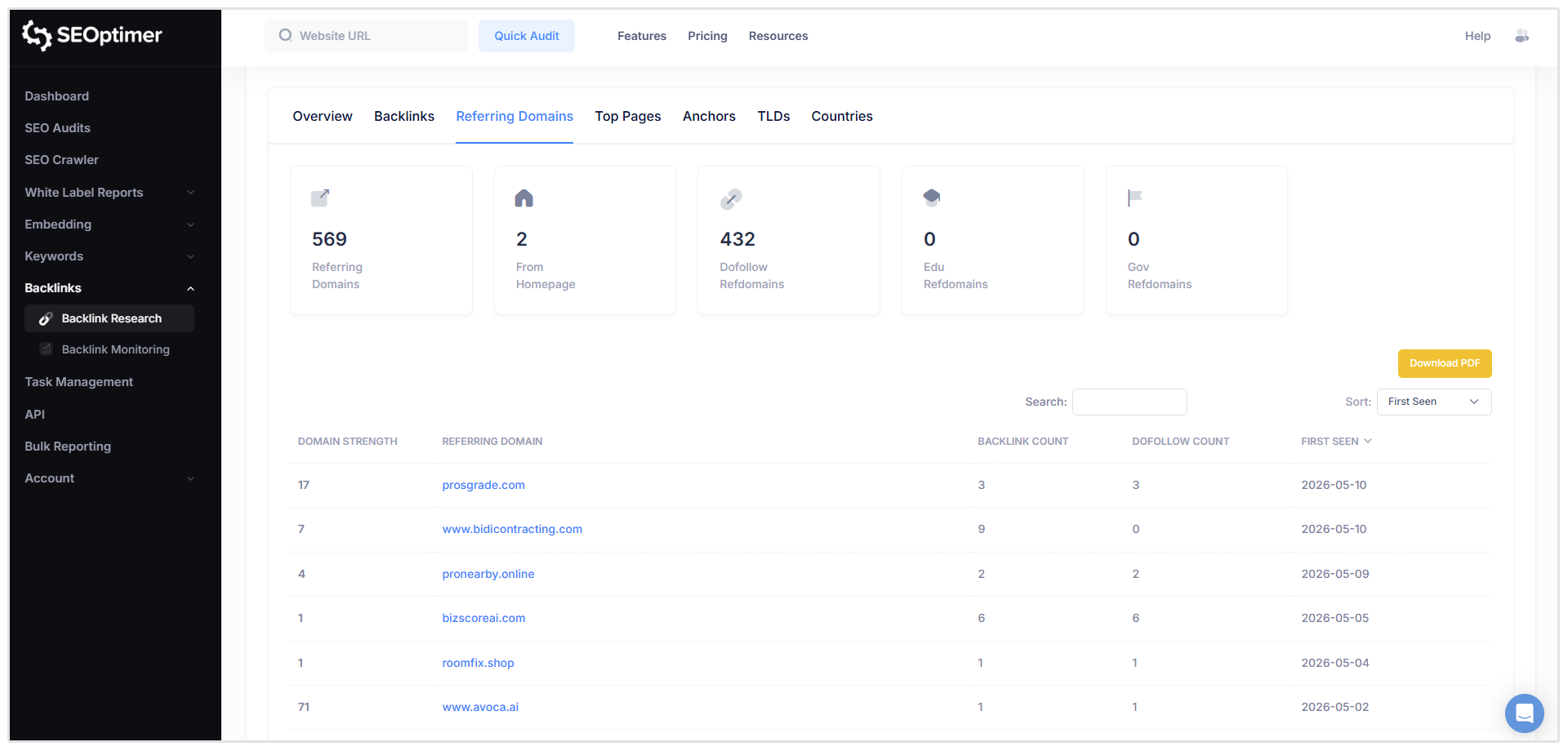
To check referring domains in SEOptimer:
- Log in to your SEOptimer account.
- Go to Backlink Research.
- Enter the domain or URL you want to analyze.
- Open the Referring Domains tab.
- Review the websites linking to the domain.
- Check each domain’s authority, relevance, and link quality.
The goal is not just to get more referring domains. You want more high-quality, relevant referring domains from websites your audience trusts.
A steady increase in quality referring domains is usually a good sign that your site is gaining authority.
8. SEO ROI
SEO ROI shows how much revenue your SEO efforts generate compared to how much you spend on SEO.
This is one of the most important SEO KPIs because it connects your organic search performance to actual business value. It helps you see whether your investment in SEO is paying off.
To calculate SEO ROI, use this formula:
SEO ROI = (Revenue from SEO - Cost of SEO) / Cost of SEO x 100
For example, if you spend $5,000 on SEO and generate $20,000 in organic revenue, your SEO ROI would be 300%.
When calculating SEO costs, include things like:
- SEO tools
- Agency or freelancer fees
- Content creation
- Link building
- Technical SEO work
- Internal team time
You can track SEO ROI by combining data from Google Analytics 4, your ecommerce platform, CRM, or sales tracking system.
SEO ROI is not always immediate, especially for newer websites. But over time, it helps show whether SEO is becoming a profitable growth channel.
9. AI Overviews and AI Search Visibility
Instead of clicking through several search results, users may now get an AI-generated answer directly in Google, ChatGPT, Perplexity, or another AI search tool.
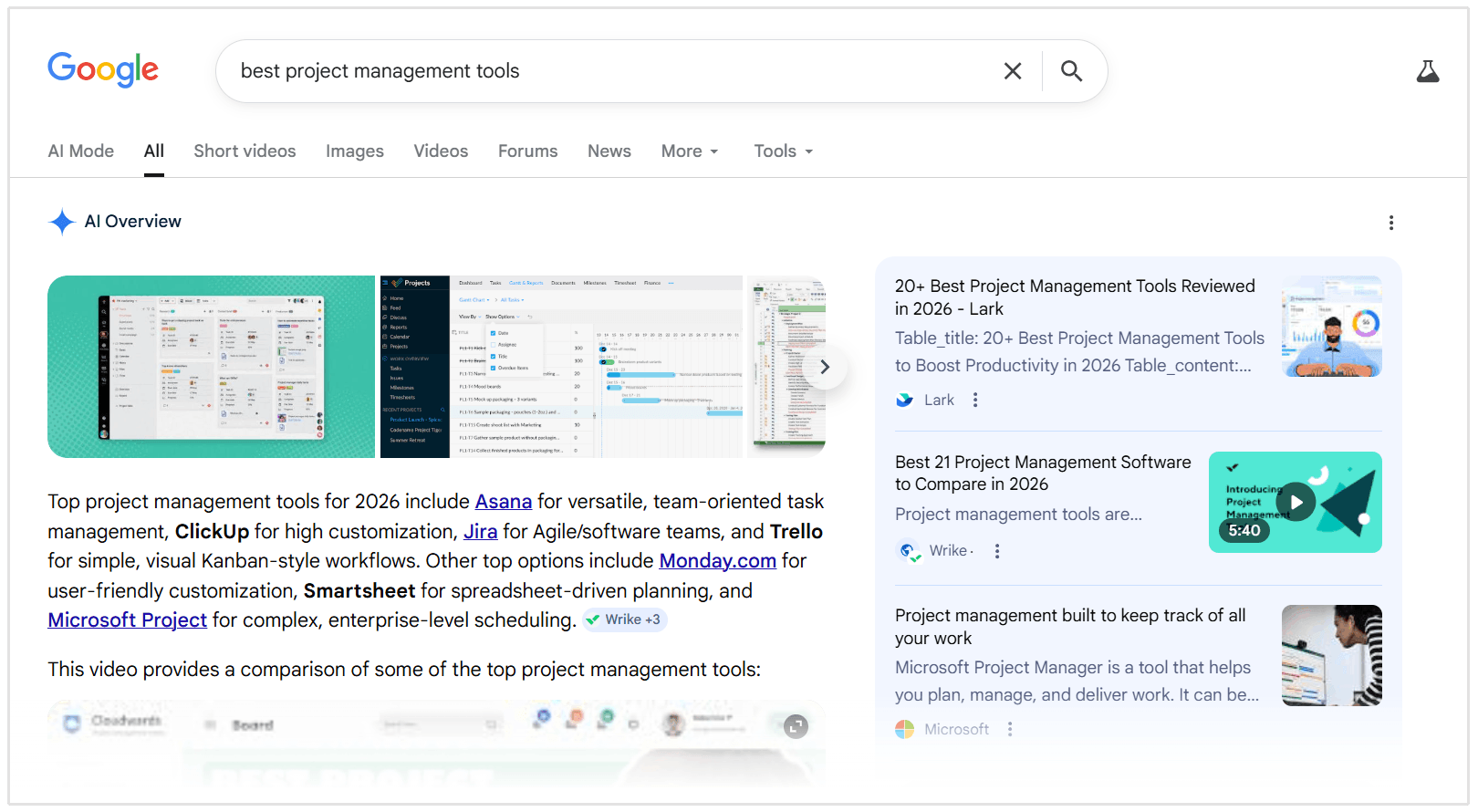
This means your brand might influence a potential customer before they ever visit your website.
That is why AI search visibility is becoming an important SEO KPI to track.
It helps you understand whether your brand, website, or content is being mentioned, cited, or recommended in AI-generated answers.
You can track things like:
- Whether your website appears in Google AI Overviews
- Which pages are cited in AI-generated results
- Which prompts or search queries mention your brand
- Whether competitors are being mentioned more often than you
- How visible your brand is across AI search tools
Related Reading: How to Rank in AI Overviews (with Insights from Top SEO Experts)
How to track AI search visibility
You can start by using SEOptimer’s GEO Audit to check how well your website is optimized for AI search.
SEOptimer’s newer AI visibility checks are designed to help websites assess their visibility in Google AI Overviews and LLMs, including AI Overview citations and traffic from those mentions.
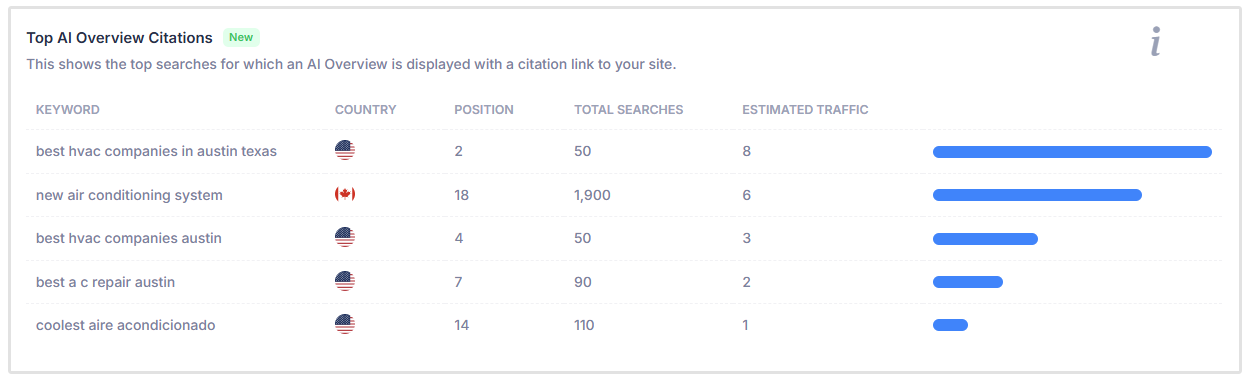
SEOptimer can also point out factors that may affect AI visibility, such as LLM accessibility, identity signals, and whether your site is appearing in Google AI search rankings.
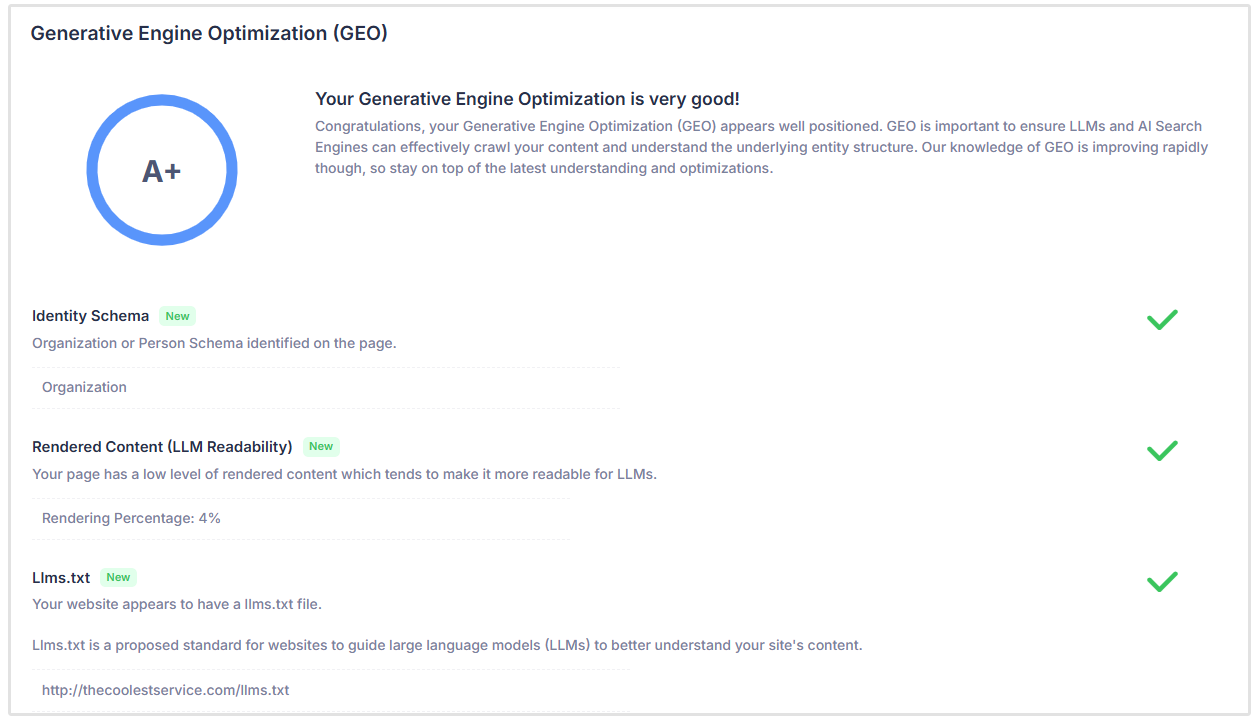
This KPI is still fairly new, but it is becoming more important as search moves beyond traditional rankings and clicks.
The goal is not only to rank in Google, but to make sure your brand is discoverable wherever people are searching, including AI-generated answers.
Related Reading: 7 Best Software for AI Visibility in Search
SEO KPI Reporting: What to Include in Monthly Reporting
A monthly SEO report transforms raw data into a clear narrative about your marketing performance.
Rather than overwhelming stakeholders with endless spreadsheets, your report should highlight the metrics that matter most to business growth.
Here is what you should include in an effective monthly SEO KPI report:
- Executive Summary: Start with a short overview of the month’s biggest wins, challenges, and progress toward your SEO goals.
- Traffic and Engagement Trends: Show how organic traffic, engaged sessions, and user behavior changed compared to the previous month or year.
- Conversion Metrics: Include organic leads, sales, sign-ups, revenue, or any other important actions that show the business impact of SEO.
- Rankings and Visibility: Report on target keyword rankings, organic impressions, clicks, CTR, and overall search visibility.
- Technical Health and Backlinks: Highlight important technical SEO issues, Core Web Vitals, new backlinks, lost backlinks, and referring domain growth.
- Actionable Next Steps: End with clear recommendations for what should be improved, fixed, or prioritized next month.
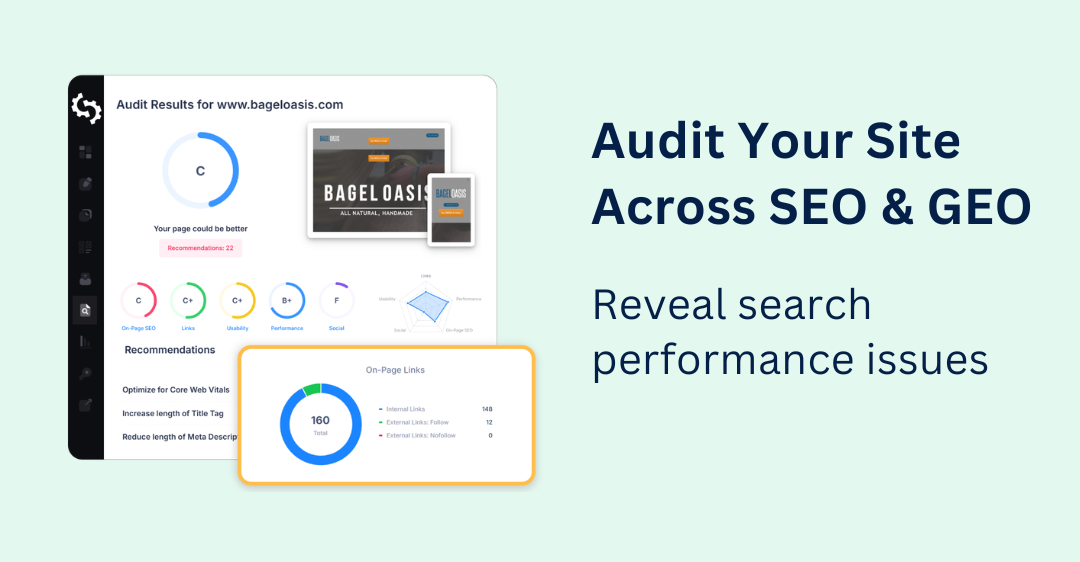
This is where SEOptimer’s website audit and reporting features can make SEO reporting much easier.
SEOptimer generates professional SEO audit reports that are easy to understand, even for clients or stakeholders with little SEO experience.
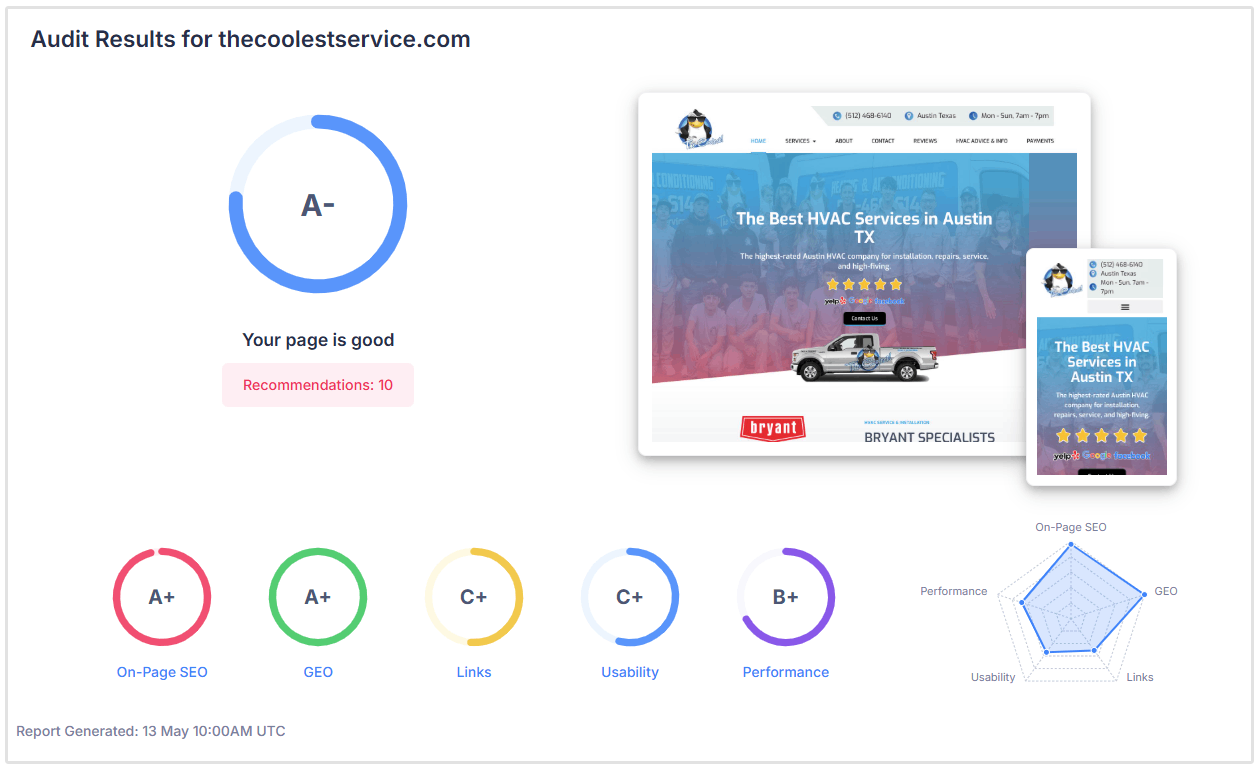
The reports highlight what is working, what needs attention, and include practical recommendations on how to fix or improve each issue.
SEOptimer also supports branded white label PDF reports, so agencies can present SEO findings in a polished, client-ready format.
Instead of simply showing a client that something is wrong, SEOptimer helps explain what the issue means, why it matters, and what to do about it. That makes your monthly SEO reporting more useful, more actionable, and much easier to turn into the next conversation or project.
Related Reading: SEO Report Sample PDF (and Explainer)
SEO KPI FAQs
What are SEO KPIs?
SEO KPIs are measurable values used to evaluate the success and effectiveness of a search engine optimization strategy. They help marketers track progress in areas like visibility, traffic, user engagement, and revenue generation.
What are the most important SEO KPIs to track?
The most important SEO KPIs vary depending on your specific business goals, but the essential metrics include organic traffic, organic conversions, keyword rankings, organic CTR, referring domains, and overall SEO ROI.
How many SEO KPIs should I track?
You should aim to track between five and ten core SEO KPIs. Tracking too few metrics limits your visibility into your performance, while tracking too many leads to data overload. Focus strictly on the indicators that align with your primary business objectives.
What is the difference between SEO KPIs and SEO metrics?
A metric is any quantifiable data point related to your website's performance, such as total pageviews or bounce rate. A KPI is a specific type of metric tied directly to a business goal. All KPIs are metrics, but not all metrics are KPIs.
Conclusion
Data is only valuable if you actually use it to make better decisions.
By tracking these nine essential SEO KPIs, you move away from guesswork and build a strategy rooted in concrete evidence.
Start by auditing your current analytics setup.
Ensure your GA4 conversion tracking is functioning correctly and that you are monitoring your keyword rankings in a reliable tool.
When you consistently review your traffic, conversions, and AI search visibility, you can easily identify what content resonates with your audience and scale the tactics that drive real revenue.