Noopener noreferrer is an HTML attribute added to external links. Most CMS automatically include it without you having to add it explicitly.
The attribute noopener stops the new browser tab from accessing the original tab’s window object.
Also, noreferrer prevents the browser from sending the HTTP referrer header. Without the referrer information, the destination website fails to know where the user came from.
Let’s understand what noopener noreferrer means in SEO and link building. Are they useful? Should you use it? And what are the pros and cons?
What Does rel="noopener noreferrer" Mean?
The rel=”noopener noreferrer” tag combo is added to external links that open in a new tab. It is used with the target="_blank".
When you add "noopener", you tell the browser to stop the new tab from controlling the original. It prevents reverse tabnabbing, where a malicious site takes over the referring site’s tab.
On the other hand, "noreferrer" ensures that no referral data (like your URL) is passed along to the destination page. Also, noreferrer stops referrer tracking, which might be useful if you don’t want analytics tools and partnered sites to see who sent the traffic.
You should use both attributes when opening links in a new tab unless you need referral data for tracking or partnerships.
Example of Noopener Noreferrer
Imagine you are running a blog, and you are linking to a third-party article about marketing trends.

You want the link to open in a new tab so your readers stay on your site.
Here's what the HTML would look like:
<a href="https://marketingtrendssite.com" target="_blank" rel="noopener noreferrer">Read more on marketing trends</a>
In this code:
Target="_blank" opens the link in a new browser tab.
Noopener tells the browser: “Don’t let that new tab control or access this one.”
Noreferrer adds a privacy layer by preventing your site’s URL from being passed along to the destination site.
Why are These Tags Important?
In link building, two tags matter the most: nofollow and dofollow.
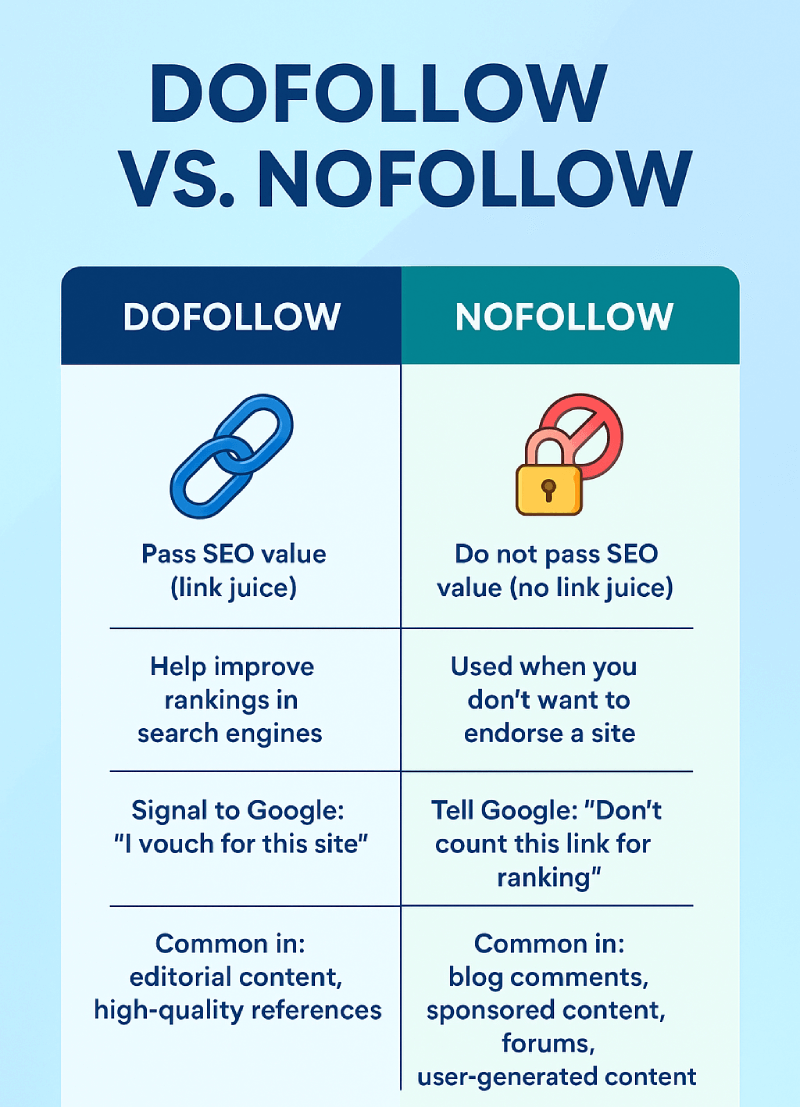
Some assume nofollow to be the same as ‘noreferrer’ or ‘noreferer’. However, they are not the same.
Using noopener noreferer does not have an impact on link equity.
SEO and link builders use rel="noopener noreferrer" to protect the domain from external attacks and to accurately track the URL data.
Most content management systems like Wix, WordPress, Squarespace, Ghost, Webflow, and others already use the noopener tag by default for all links.
When you add a link, by default, a target="_blank" attribute is added.
This attribute alone introduces a security vulnerability unless paired with noopener. The destination page gains access to the source window object, which allows manipulation through scripts.
Applying noopener removes that risk entirely.
Noopener noreferrer are also used to protect the domain’s trust and to improve browser performance so that links are opened correctly, faster, and without any security gaps.
Correct implementation of rel="noopener noreferrer" leads to clean linking practices that enhance search engine crawlability and reduce risk exposure for better SEO campaign results.
Pros and Cons of Using Noopener Noreferrer
From both SEO and security perspectives, the combination of noopener noreferrer supports stronger link execution.
However, there are certain cons that should be considered.
Below is a breakdown of the measurable advantages and limitations of using noopener noreferrer.
Here are the pros of using noopener noreferrer in external links:
- Protects from Tabnabbing: When link builders use target="_blank" to open a link in a new tab, it creates a security flaw called reverse tabnabbing. It can lead to phishing attacks and unnecessary redirects that damage the domain reputation. By adding rel="noopener", you can save your website from such attacks, as it prevents the new tab from having any access to the original browser window.
- Improves Browser Performance: Besides enhancing security, rel="noopener" can actually improve browser performance. Without it, the new tab remains connected to the original tab through the window.opener property. That connection uses memory and browser resources unnecessarily. By using noopener, you remove that link, which results in cleaner resource handling.
- Offers More Control Regarding Referral Data: Using rel="noreferrer" gives SEOs and link builders control over whether or not to pass referral data to the destination page. If you are linking to a competitor or a sensitive page, hiding the fact that your site sent traffic may be strategic. On the flip side, if you are in affiliate marketing or partnerships where you need to prove referral traffic, you should not use noreferrer.
- Has No Negative Impact on SEO: Website owners get confused and assume that noopener is the same as nofollow. However, neither noopener nor noreffer impact the flow of link juice. They are purely for browser behavior and privacy. Link builders can safely use them without risking their backlink strategies or losing value from high-authority external links.
Here are the cons of using noopener norefeer in external links:
- You Lose Referral Data with noreferrer: When you use rel="noreferrer", it prevents the destination website from seeing where the visitor came from. It is useful for privacy, but not ideal when tracking matters. For example, affiliate marketers, brand partners, or analytics teams often need that referral information for reporting, payment, or optimization. If you are hiding it with a noreferrer, you might miss out on attribution or even revenue.
- Compatibility Issues with Some Analytics Tools: Some older or custom analytics systems still use the Referer header to track visitor journeys. If noreferrer is applied, URL tracking tools might show traffic as “direct” instead of showing the actual source. Hence, the reports might be inaccurate, and SEOs or website owners might not know where the traffic is really coming from.
- Can Lead to Overcomplication in Templates: On large websites with complex CMS setups, managing noopener noreferrer tags on every external link can be time-consuming. It might require extra scripting, plugin configurations, or manual effort. If not handled consistently, it can cause a mix of secure and insecure links, which isn’t ideal for long-term maintenance.
Best Practices for Link Builders
Follow these best practices when using noopener noreferrer in link building:
Use rel="noopener" with target="_blank"
You should use rel="noopener" with links that open in new tabs via target="_blank". It prevents access to window.opener from the linked page and eliminates tabnabbing risks.
Also, it ensures secure behavior without affecting SEO or PageRank. You should treat this as a default for all external links opening in a new tab.
Use rel="noreferrer" with Caution
You should include rel="noreferrer" in external links to block referral information from being passed to the destination URL. You should add this tag only in privacy-sensitive scenarios or when referral tracking must be avoided.
Avoid Overuse of Noreferrer in Link Building
Try to avoid the excessive use of noreferrer as it reduces visibility in analytics and weakens the value of backlinks in outreach campaigns.
Referral headers help receiving sites recognize traffic sources and link credibility. Be mindful when using this attribute, and do not make it a default for all backlinks.
Combine with Nofollow, UGC, or Sponsored as Needed
Use nofollow for untrusted or promotional links, UGC for user-generated content, and sponsored for paid placements or affiliate references.
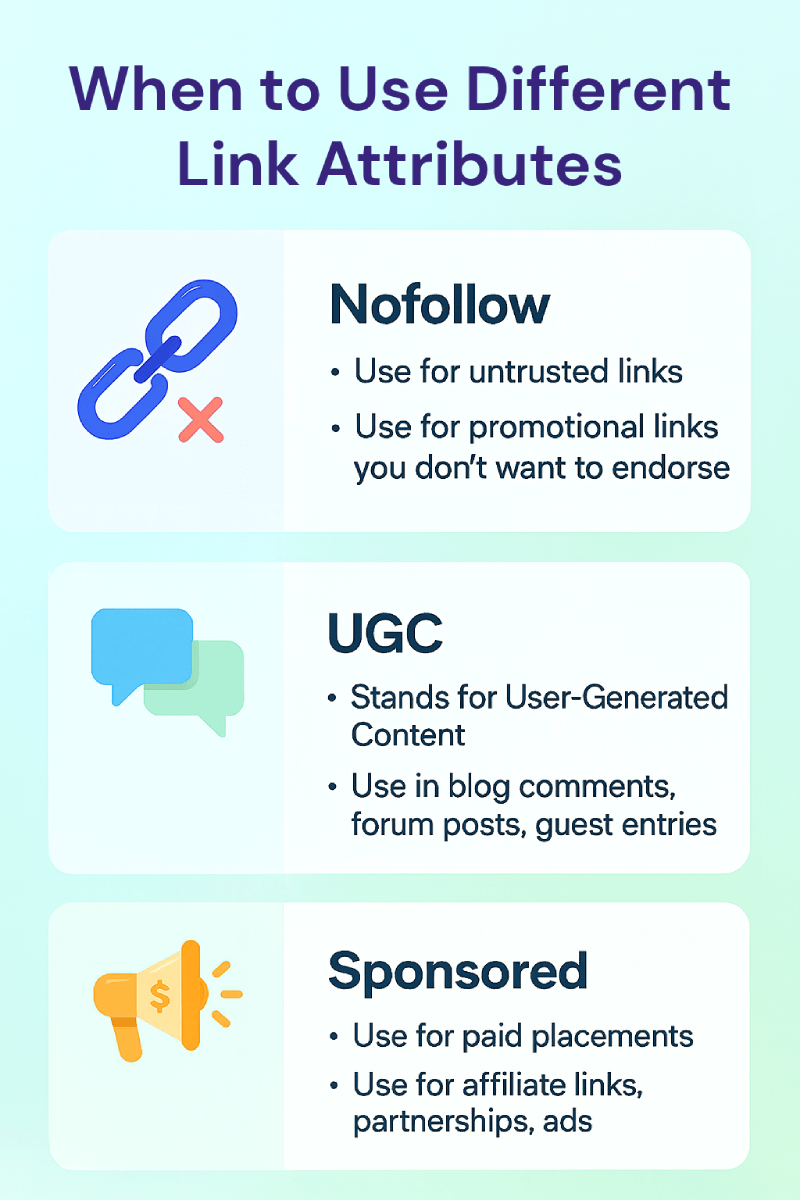
When links open in new tabs, pair with noopener for security. Avoid pairing with noreferrer unless required by compliance or privacy.
FAQs
Does rel="noreferrer" hurt SEO?
No. rel="noreferrer" does not hurt SEO. Google follows links with noreferrer and passes PageRank (link equity) as long as nofollow or sponsored is not present. The noreferrer tag affects browser behavior, not how search engines evaluate or rank pages.
Link authority, indexing, and anchor text relevance are fully preserved. The only downside is referral data loss.
When this tag is used, the destination site cannot see where the traffic came from. That means platforms like Google Analytics or affiliate dashboards will miss referrer info. Hence, this affects tracking, not rankings.
Is noopener necessary for internal links?
No, rel="noopener" is not necessary for internal linking. Adding contextual links to your own site does not introduce the same security risks associated with external links.
The primary function of noopener is to prevent reverse tabnabbing, and this type of threat originates from third-party domains, not from links within the same site.
Internal links operate within a trusted environment under the same domain, and therefore, browser security protocols already restrict dangerous behavior across identical origins.
Can I remove these tags manually?
Yes, you can remove rel="noopener noreferrer" by directly editing the HTML code. Open your CMS in edit mode and go to the hyperlink.
Now, remove the noopener noreferer from the external or internal link. If your CMS is adding these values by default, then you need to take the help of a developer to override automated insertion through templates or plugins.
What's the difference between noreferrer and nofollow?
Noreferrer is a browser-level instruction that prevents the referring URL information from passing to the destination page, while nofollow is an SEO-specific instruction that prevents the flow of link equity from the main domain to the linked site.
The primary difference lies in function: noreferrer affects referral data visibility in the browser, whereas nofollow affects ranking signal transfer in search engines.
Conclusion
You should use rel="noopener noreferrer" for external websites that open in a new tab. Similarly, you should apply noreferrer when hiding referral data.
Also, make sure not to use these attributes on internal links. Internal navigation does not introduce external security risks or require referral control, so adding unnecessary attributes creates clutter in the code without providing benefits.
Remember that neither noopener nor noreferrer affects rankings. Search engines continue to follow the links, pass link equity, and process anchor text. Only nofollow and sponsored attributes control SEO value transfer.