



What this Guide Covers
By the end of this guide, you'll know exactly how to:
- Generate high-quality SEO leads using your SEOptimer account.
- Present professional reports that win client trust.
- Close deals faster with proven sales techniques.
- Deliver ongoing value that keeps clients paying month after month.
Whether you're a solo freelancer or a growing agency, this guide will show you how to turn SEOptimer into your #1 client acquisition and retention tool.
Why Agencies Choose SEOptimer?
Over 3,000 digital agencies worldwide use SEOptimer to win and retain clients. Here's why:
- White-label branding: Reports look like you built them.
- Professional credibility: Clients see you as the expert.
- Fast delivery: Generate reports in seconds, not 2 hours.
- Lead generation built-in: Embeddable tools capture leads 24/7.
- Scalable: Serve 5 clients or 500 with the same effort.
The bottom line: SEOptimer helps you look bigger, work faster, and close more deals.
Position Your Agency for Maximum Impact
Before generating leads, decide who you serve. The most successful SEOptimer agencies don't try to serve everyone.
Here are three positioning strategies that work:
1. Industry Niche (e.g., "SEO for Dentists", "eCommerce SEO Specialists")
When prospects see you specialize in their industry, you immediately stand out from generalist agencies.
Example: Denteel is a digital agency offering digital marketing services for dental clinics.

2. Location Niche (e.g., "Austin's #1 Local SEO Agency")
Local connections and in-person relationships give you an advantage over remote-only agencies. You understand the local market.
Example: Tasty Placement is an SEO agency offering services to Austin-based businesses.

3. Service Niche (e.g., "Technical SEO Specialists", "Link Building Experts")
Deep specialization in one SEO service signals expertise and justifies premium pricing.
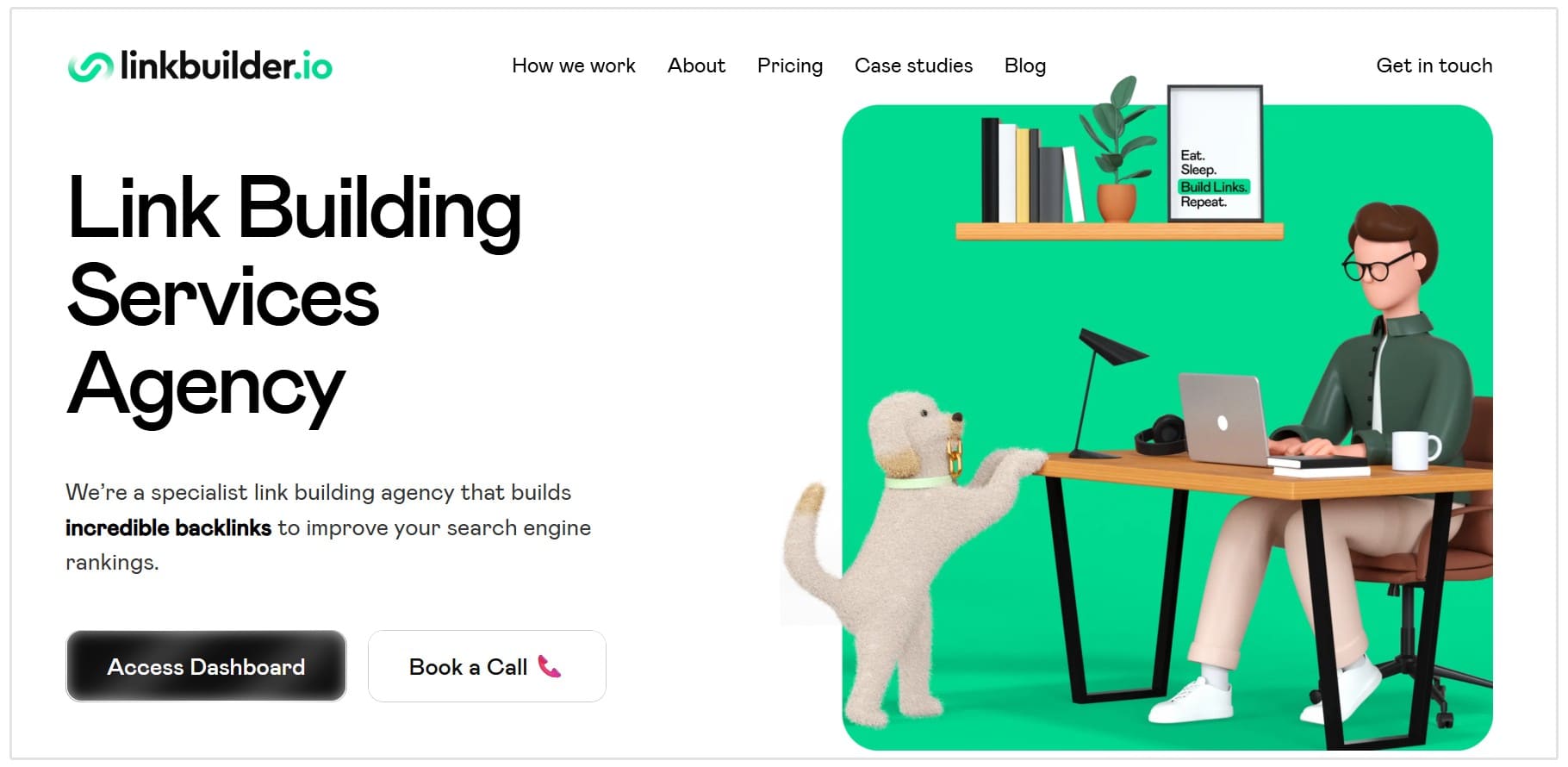
Example: Linkbuilder.io is an agency that offers only link-building services, making them a specialist in the field.
Why do this?
According to a 2021 study in the Journal of Small Business Strategy, niche strategies enable small businesses to command premium prices by deeply understanding their target market (Galli-Debicella, 2021).
Specialization makes you the obvious choice!
Action Step: Choose your niche before you start generating leads. Update your website homepage to reflect this specialization (e.g., "We Help Law Firms Rank #1 on Google").
Part 1: Generating SEO leads
The Embedded Audit Tool: Your 24/7 Lead Machine
The Embedded Audit Tool is your secret weapon for generating leads while you sleep.
How it works:
- Embed a free SEO audit form on your website.
- Visitors enter their website URL and email.
- They receive an instant, branded SEO report.
- You receive their contact details as a qualified lead.
Where to Place Your Embed Form
High-converting locations:
- Homepage: Above the fold with a clear headline: "Get Your Free SEO Audit in 20 Seconds."
- Service pages: On your "SEO Services" or "Local SEO" pages.
- Blog posts: At the end of educational content as a CTA.
- Landing pages: Dedicated pages for paid ad traffic.
Pro tip: Use a headline that emphasizes speed and value:
Don't do: "Request an SEO audit"
Do: "See your SEO score in 20 seconds (100% free)"
Setting Up Lead Capture (step-by-step)
For White Label + Embedding users:
- Log into SEOptimer.com
- Go to "Embedding Settings" in the left menu
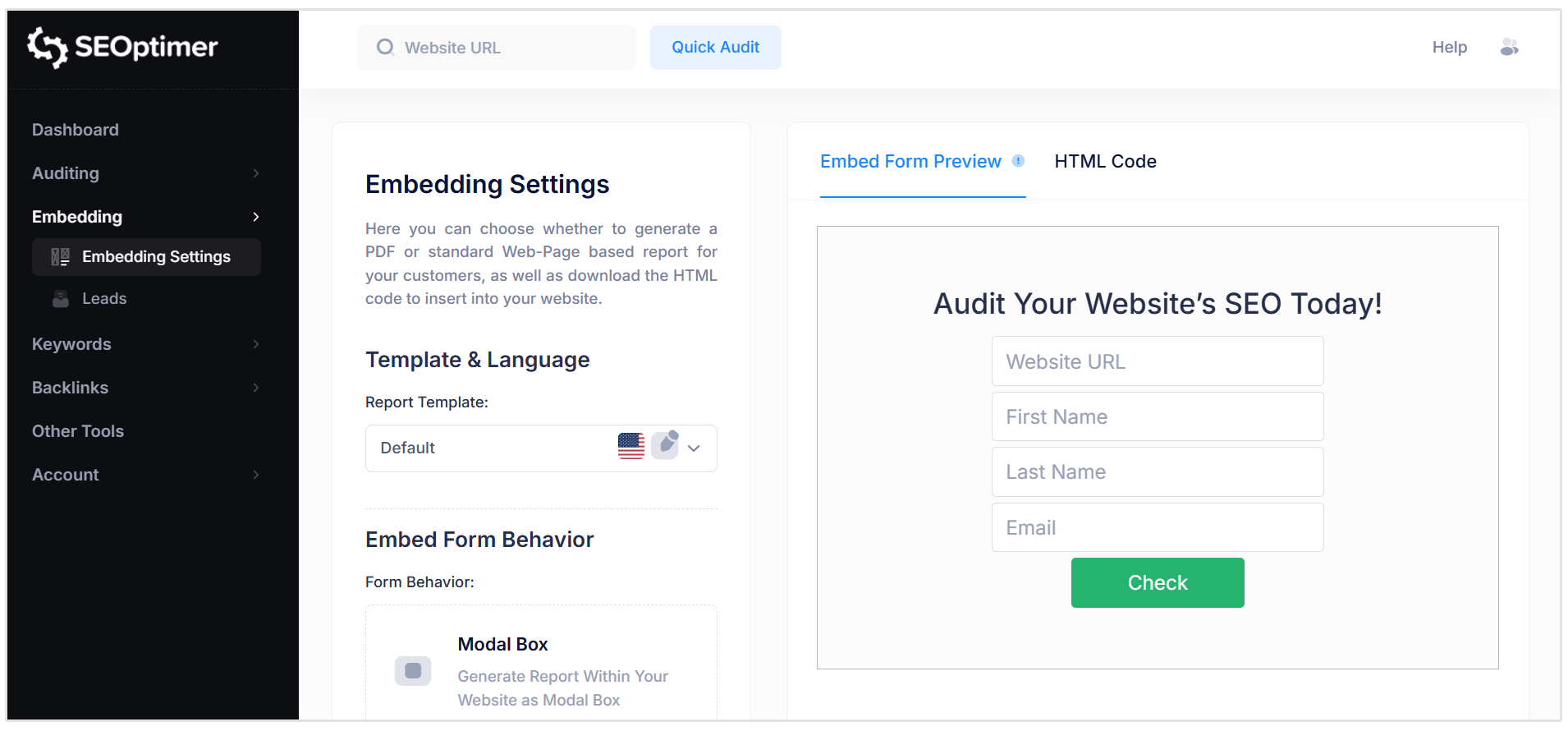
Customize your form:
- Add your logo
- Choose your brand colors
- Select required fields (name, email, phone, website)
- Copy the embed code
- Paste it into your website (WordPress, Shopify, Wix, etc.)
- Set up Zapier integration to send leads to your CRM automatically
Looking for platform-specific help? SEOptimer provides detailed tutorials for WordPress, Wix, Squarespace, and Webflow. Find them in our resources section or Live Chat.
Troubleshooting: If leads aren't showing up in your dashboard after 24 hours, check:
- Did you paste the embed code correctly?
- Is the form visible on your live site (not just in preview)?
- Did you test it by submitting a lead yourself?
Expected results:
- 10–30 leads per month (conservative estimate for small agencies)
- 5–10% conversion rate = 0.5–3 new clients per month
Other Lead Generation Tactics
1. Create SEO-Optimized Services Page
Target local keywords like "SEO agency in NYC" or "dental SEO services."
Thrive Internet Marketing does a great job with their service and location pages. As you can see in the below screenshot, they have a lead generation form embedded in the hero section of all their location pages:
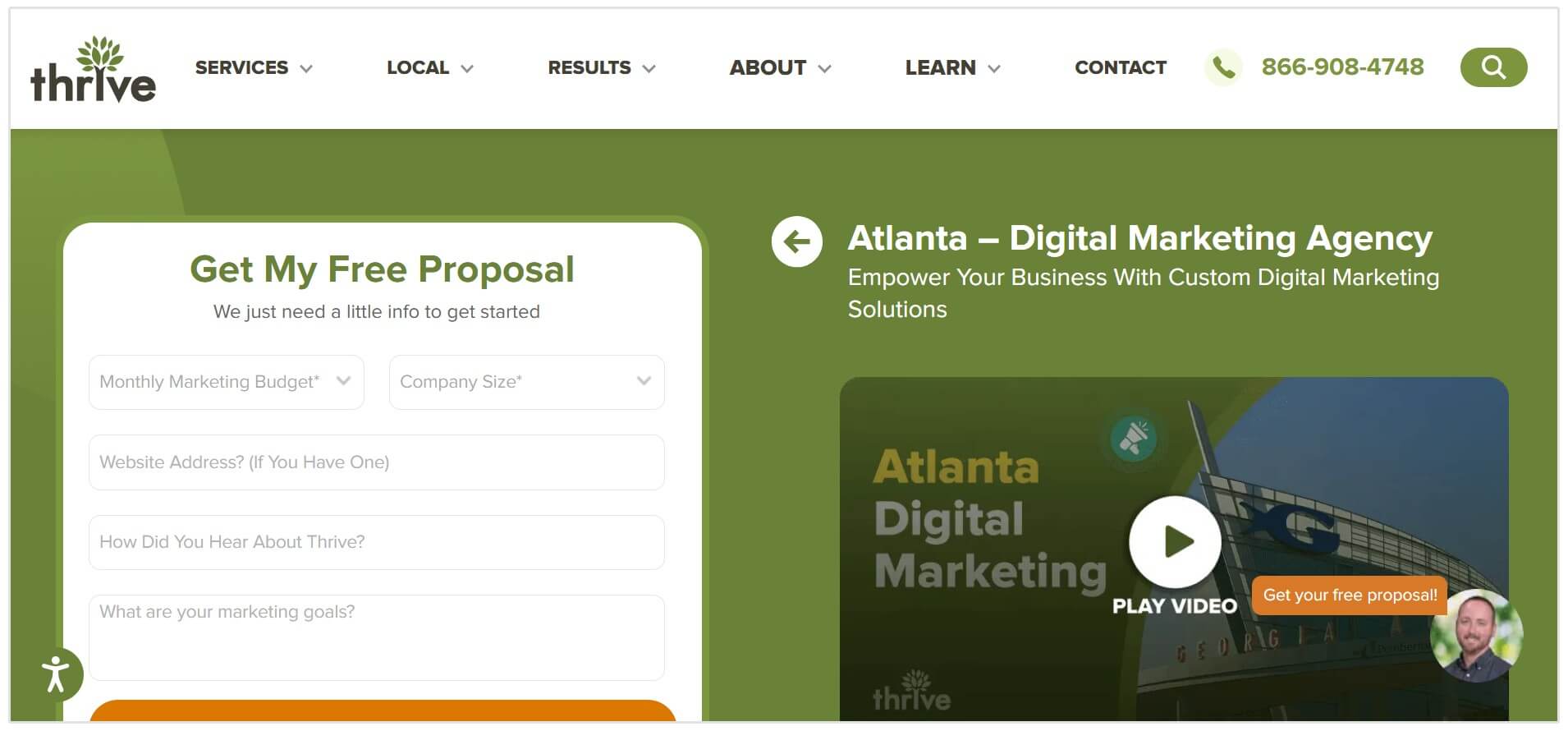
Here's an example structure that you could follow:
- Hero section: "Portland's #1 SEO Agency for Local Businesses"
- Embed form: Free SEO audit CTA
- Social proof: Client logos, testimonials, case studies
- Services overview: What you offer and who you serve
2. Reach Out to Poorly Ranked Websites (ideally located in your area)
How to find them:
- Google search for your niche and city. E.g. seo agency portland
- Navigate to pages 5–10 of results
- These businesses need SEO help (they're not ranking!)
And here's an outreach template you could use:
Hi [Name],
I was searching for [industry] businesses in [city] and noticed [Company Name] wasn't showing up on page 1 of Google.
I ran a quick audit of your website and found a few quick fixes that could help you rank higher. Would you like me to send you the full report?
No cost, no obligation—just want to help.
Thank you!
[Your Name]
3. Attend Local Networking Events
Meet potential clients face-to-face at:
- Chamber of Commerce meetings
- BNI chapters
- Industry-specific conferencesLocal business meetups
Your pitch:
"I help [industry] businesses get found on Google. Want a free audit of your website? I can email it to you tonight."
Part 2: Selling SEO services
The SEOptimer Sales Process
Step 1: Generate the Audit (20 seconds)
Run a White Label Audit of the prospect's website using SEOptimer.
Step 2: Customize the Report
Before sending:
- Add your logo and brand colors
- Include a personalized note at the top highlighting 2–3 key issues
- Export as PDF for easy sharing
Step 3: Send with Context
Don't just attach the PDF. Frame it by adding some context:
Hi [Name],
Here's the SEO audit of [their website].
Quick summary:
- Your site loads in 3.2 seconds (good)
- You're missing meta descriptions on 15 pages
- Only 3 backlinks (competitors have 50+)
The full report shows exactly how to fix these issues.
Want to jump on a quick call this week to discuss?
[Your Name]
Step 4: Follow up - The 5-Touch Sequence
Critical: 80% of sales require 5 or more touchpoints. Most agencies give up after one email so don't make that mistake.
The 5-Touch Follow-Up Sequence:
Day 0: Send initial audit report with value-first email (Step 3 above)
Day 3: Quick follow-up
Hi [Name],
Just checking in—did you get a chance to review the SEO audit I sent over?
Happy to walk you through the biggest opportunities on a 15-minute call. Does [Day] at [Time] work?
Thanks!
Day 7: Provide additional value (competitor insight)
Hi [Name],
I ran a competitor analysis and noticed [Competitor Name] ranks higher than you for "[keyword]."
Here's why: They have 45 backlinks and updated content from 2024. You have 3 backlinks and your last blog post is from 2022.
Want to close that gap? We can help.
Thanks!
Day 14: Social proof (case study)
Hi [Name],
I thought you might like to see this: We just helped [Similar Business] increase their organic traffic by 150% in 6 months.
Their situation was similar to yours—ranking on page 2-3 for key terms. Now they're consistently on page 1.
Want to see their before/after? I can send you the case study.
Day 30: Final touch (graceful exit)
Hi [Name],
Last follow-up—I know you're busy. If now's not the right time to improve your SEO, no worries at all.
Feel free to reach out whenever you're ready. The audit I sent will still be relevant in 3-6 months.
Best of luck with your business!
Pro tip: Use Mailchimp, Intercom or HubSpot sequences to automate this follow-up process. Set it once and it runs automatically.
Additional Email Templates
Template #2: For Embedded Audit Leads
Use this template when someone runs an audit through your website's embedded tool:
Subject: Your [Score]/100 SEO Audit - Here's What to Fix First
Hi [Name],
Thanks for running an SEO audit through our site. I took a closer look at your results and wanted to reach out personally.
Your site scored [Score]/100. The main issues holding you back are:
- [Specific high-priority issue from their report]
- [Another critical issue]
- [One more]
We help businesses like yours get to an A score in 30-90 days. Here's a recent example: [Link to case study].
Want to discuss a plan to improve your rankings? Let me know when you're free for a quick call.
[Your Name]
Template #3: Asking for Referrals
Send this to satisfied clients after 3-6 months of great results:
Subject: Quick favor from you
Hi [Client Name],
Hope you're doing well! I wanted to check in and see how things are going with your SEO.
Since we started working together, your organic traffic is up [X]% and you're now ranking #[Y] for "[keyword]." Pretty awesome progress!
Quick favor: Do you know any other [industry] business owners who might benefit from similar results? If you're happy with our work, I'd love a warm introduction.
As a thank you, I'll give you [10% off next month / free audit of another site / $100 credit] for each referral that becomes a client.
Thanks for being a great client!
[Your Name]
Overcoming Common Objections
Objection 1: "We can't afford it"
Response:
"I totally understand. Let me ask, how much are you currently spending on [Google Ads / print ads / other marketing]? SEO costs less and delivers long-term results. Plus, we can start small with just the highest-impact fixes."
Show the savings and ROI:
- SEO agency: $500–1,000/month
- SEOptimer (DIY): $29/month
- Your agency: $299–499/month (positioned as affordable expert help)
Objection 2: "SEO Takes Too Long"
Response:
"That's not true. We've seen clients rank on page 1 within 4–8 weeks for local keywords. Plus, we focus on quick wins first, like fixing your missing meta descriptions, so you see progress right away."
Objection 3: "We Already Tried SEO and it didn't Work"
Response:
"Usually, it's because the previous agency focused on the wrong things or didn't communicate results clearly. That's why we send monthly reports showing exactly where you rank and how much traffic you're getting. Full transparency."
Pricing your Services
Recommended pricing tiers:
| Package | Price | What's Included |
|---|---|---|
| SEO Audit + Roadmap | $299 (one-time) | Full site audit, prioritized task list, 30-min strategy call |
| Monthly SEO Essentials | $499/month | On-page optimization, monthly reports, keyword tracking |
| Growth Plan | $999/month | Everything above + content creation, link building, competitor analysis |
Pro tip: Always offer a small entry package ($299 audit) to get clients in the door. Once they see results, upsell to monthly retainers.
Check out the SEO agency pricing guide 2026 by Clutch to help you price your services.
Part 3: Delivering Professional Client Reports
Why Client Reporting Matters
Client reporting is how you:
- Prove ROI and justify your fees
- Build trust and reduce churn
- Identify upsell opportunities
The rule: Report at least monthly. Weekly is even better for new clients.
What to Include in Every Report
1. Executive Summary (Top of Report)
Example:
December 2025 Summary
- Organic traffic: +32% (vs. November)
- Page 1 rankings: 12 keywords (up from 8)
- Domain Authority: 38 (up from 35)
This month's focus: On-page optimization + 5 new backlinks
2. Key Metrics
Use SEOptimer to track:
- Keyword rankings (are they moving up?)
- Backlinks (quantity + quality)
- Site health score (A, B, C, D, F grades)
- Page speed and mobile-friendliness
- Traffic (from Google Analytics)
3. Work Completed
Show what you did:
- "Fixed meta descriptions on 10 pages"
- "Published 2 blog posts targeting [keywords]"
- "Built 3 high-quality backlinks from [domains]"
4. Next Month's Plan
Set expectations:
- "Goal: Rank #1 for '[keyword]'"
- "Plan: Create 3 more blog posts, build 5 backlinks, optimize product pages"
How to Create White Label Reports in SEOptimer
- Log into SEOptimer
- Click on "Report Templates" in the left
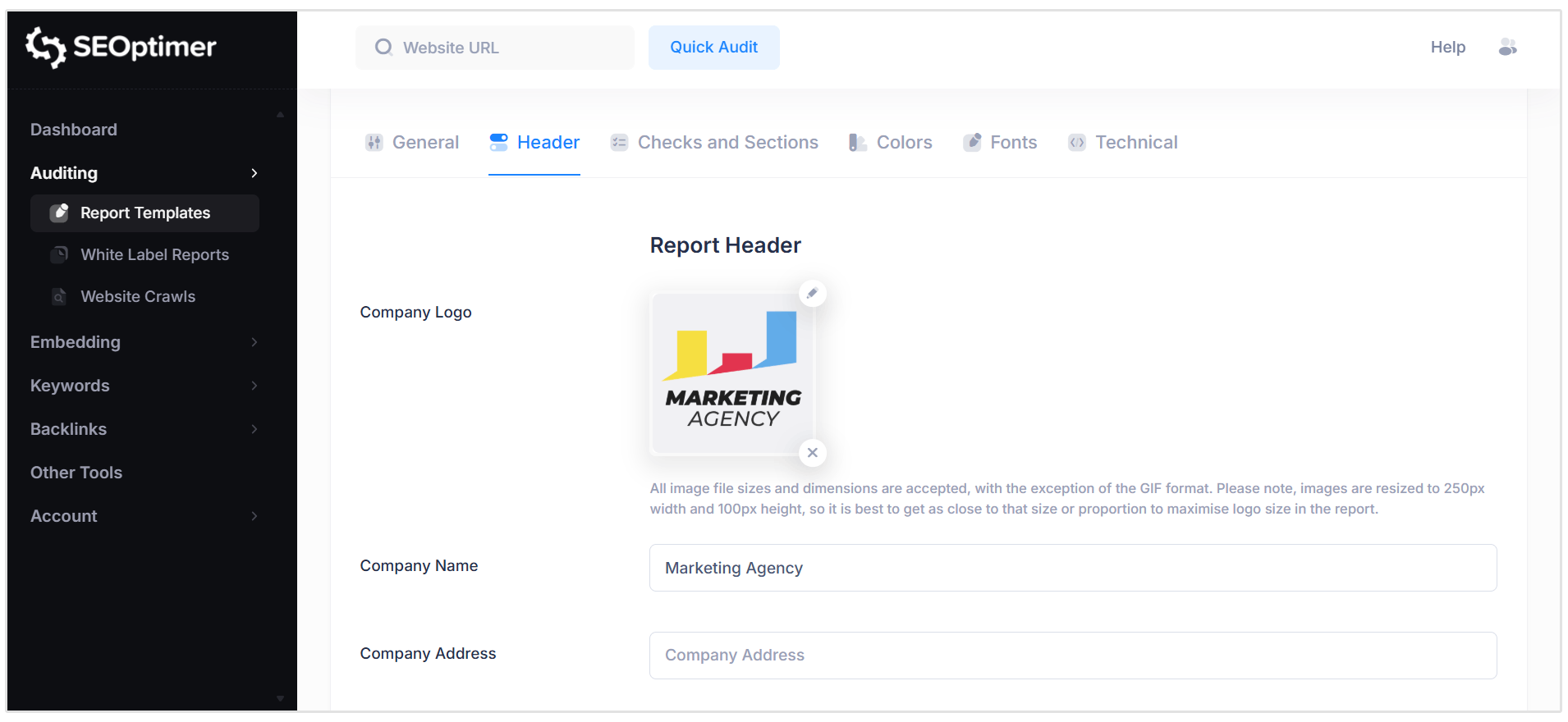
Here you should add the following:
- Your logo
- Your brand colors
- Client's company name
- Custom domain (e.g., reports.youragency.com)
Export as PDF or share via link.
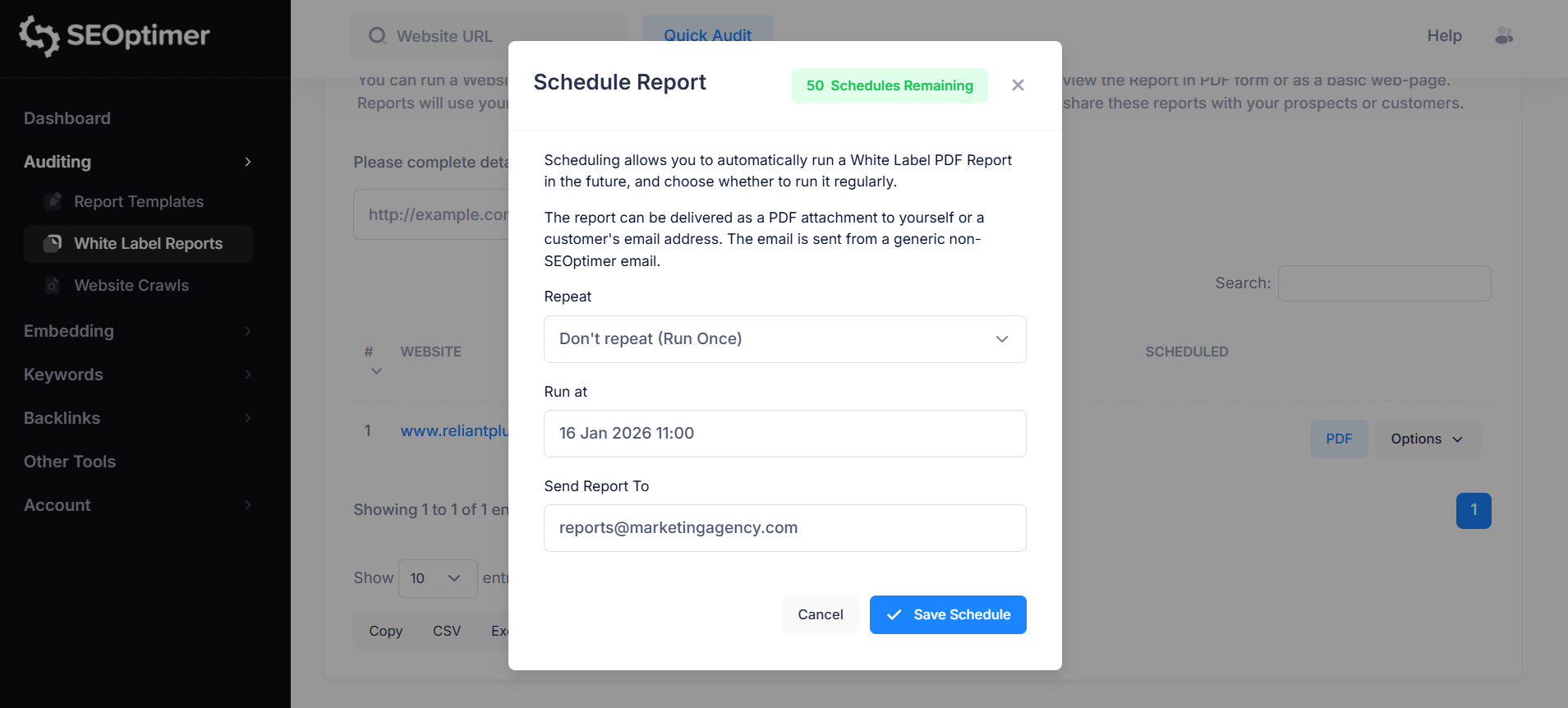
Pro tip: Schedule automated monthly reports so clients receive them without you lifting a finger. You can set up scheduled reports under Options in the White Label Reports section of your dashboard.
Check out White Label Reports Templates Explained for more information.
Report Delivery: Best Practices
Do:
- Keep it under 2 pages (executives are busy)
- Use visuals (graphs, charts, before/after screenshots)
- Highlight wins ("You're now ranking #3 for 'best plumber Rio'!")
- Include a clear CTA ("Let's discuss expanding to 3 more cities")
Don't:
- Use technical jargon (avoid terms like "canonical tags," "hreflang")
- Overwhelm with data dumps
- Send without context ("Here's your report" = lazy)
Part 4: Scaling Your Agency with SEOptimer
How Agencies Use SEOptimer to Grow
1. Automate reporting
Set up bulk reports for multiple clients at once. This alone could save 10–15 hours per month.
2. White Label everything
Clients see:
- Your logo
- Your domain (reports.youragency.com)
- Your brand colors
- They never know SEOptimer exists. You look like you built the tool yourself.
3. Upsell with data
Use reports to identify opportunities:
- "You're ranking #4 for '[keyword]'—let's push to #1 with 3 more blog posts"
- "Your competitors have 50 backlinks, you have 10—let's close that gap"
Our Case Study: North Shore Digital
Agency: North Shore Digital (Vancouver, Canada)
Niche: Financial services SEO
Setup: Embedded SEOptimer audit tool on landing pages + Zapier integration to SharpSpring CRM
Read the case study for yourself
Results:
- 25-40 qualified leads per month from embedded tool
- 8-12% close rate = 2-4 new clients per month
- Average client value: $2,500/month
- Now serving 2,000+ agencies worldwide
- ROI timeline: Embedded tool paid for itself in Week 1
Key takeaway: "The embed tool removed cold calling from our process entirely. Leads come to us pre-qualified and already interested. We just follow up and close."
Part 5: Retention Strategies
How to keep clients paying month after month
Critical stat: Acquiring a new client costs 5x more than retaining an existing one. A 5% increase in retention can increase profits by 25-95%.
1. Set clear expectations early
During onboarding, explain:
- SEO takes 2–4 months to show significant results
- Google updates constantly, SEO is ongoing, not one-and-done
- You'll send monthly reports so they see progress
- Define what "success" looks like (specific rankings, traffic goals)
2. Deliver Quick Wins (First 30 Days)
- Week 1: Fix all on-page issues (meta descriptions, title tags, broken links)
- Week 2: Build 2–3 high-quality backlinks
- Week 3: Publish 1 optimized blog post
- Week 4: Send first report showing improvements
Why it works: Early wins build trust which builds long-term retention!
3. Proactive Communication
Don't wait for clients to ask "What are you doing?"
Send:
- Weekly updates (quick email with 2–3 completed tasks)
- Monthly reports (full performance summary)
- Quarterly strategy calls (review goals, adjust tactics)
4. Show Competitive Context
Run competitor audits every 3 months:
- "Your competitor ranks #2 for '[keyword]'—here's how we'll beat them"
- "They have 60 backlinks, you have 45—let's close the gap"
Why it works: Competitive motivation keeps clients engaged and renewing.
5. Red flags that might indicate churn risk
Watch for these warning signs:
- Client stops responding to emails
- Late or missed payments
- Client asks about cancellation policy
- Declining engagement on strategy calls
Action: Schedule an immediate check-in call. Ask: "Is there anything we can do better?" Often you can save the relationship by addressing concerns early."
6. Identify upsell opportunities
When clients hit these milestones, offer expanded services:
- Ranking #1 for primary keyword → Offer to target 5 more keywords
- Traffic up 100% → Offer conversion rate optimization
- Strong local rankings → Offer expansion to nearby cities
- High domain authority → Offer content marketing package
Quick Reference: SEOptimer Features for Agencies
| Feature | How to Use It | Best For |
|---|---|---|
| White Label Reports | Customize with your branding | Client reporting |
| Embeddable Audit Tool | Generate leads on your website | Lead generation |
| Bulk Reporting | Run reports for 10+ clients at once | Scaling agencies |
| Scheduled Reports | Automatically send recurring reports | Client retention & automation |
| Keyword Tracking | Monitor client rankings over time | Proving ROI |
| Backlink Research | Find link-building opportunities | Competitive analysis |
| Crawl Report | Identify all technical SEO issues | Onboarding new clients |
| Custom Domain | Host reports at reports.youragency.com | Professional branding |
| Zapier Integration | Auto-send leads to your CRM | Automation |
Action Plan: Your First 30 Days
Week 1: Set Up Lead Generation
- Embed the SEOptimer audit tool on your homepage
- Create a dedicated landing page for "Free SEO Audit"
- Set up Zapier to send leads to your CRM/email
Week 2: Optimize your sales process
- Create 3 email templates (initial outreach, follow-up #1, follow-up #2)
- Customize your White Label report template
- Practice your sales pitch using the objection responses above
Week 3: Generate your first leads
- Reach out to 10 poorly-ranked businesses in your niche
- Attend 1 local networking event
- Publish 1 blog post with an embedded audit CTA
Week 4: Close your first deal
- Follow up with all leads from Week 3
- Send customized SEOptimer reports to top 3 prospects
- Book 2–3 sales calls
Tools to Pair with SEOptimer
| Tool | Purpose | Why You Need It |
|---|---|---|
| HubSpot | CRM for managing leads | Track where each lead is in your pipeline |
| Zapier | Automation | Connect SEOptimer to your CRM/email |
| Loom | Video messaging | Record personalized audit walkthroughs for prospects |
| Google Analytics | Traffic data | Show clients how much traffic they're getting |
| Mailchimp | Email automation | Automate follow-up sequences |
Final Words from the Experts
Winning clients with SEOptimer isn't complicated. It comes down to three things:
- Generate leads consistently (embed tool + outreach)
- Close deals professionally (branded reports + clear value)
- Deliver ongoing results (monthly reporting + quick wins)
The agencies who succeed with SEOptimer are the ones who:
- Use the embed tool to generate leads 24/7
- Send white-label reports that wow prospects
- Communicate results clearly and often
You have everything you need to start winning clients today.
Need Help?
Live Chat: Click the chat icon (bottom right of your SEOptimer dashboard)
Email: [email protected]
Response time: Within 24 hours
Now go win some clients!


.png)
.png)