.png)
Staying on top of performance shouldn’t mean manually running the same report every week. Our report scheduling feature takes that task off your plate by automatically generating and delivering reports at your chosen intervals.
In this guide you’ll learn how the tool works and how to set up your first scheduled report.
What are Scheduled White Label Reports?
Scheduled White Label Reports is a feature that allows you to schedule a white labeled audit report to run on a specific date and time at a predetermined frequency.
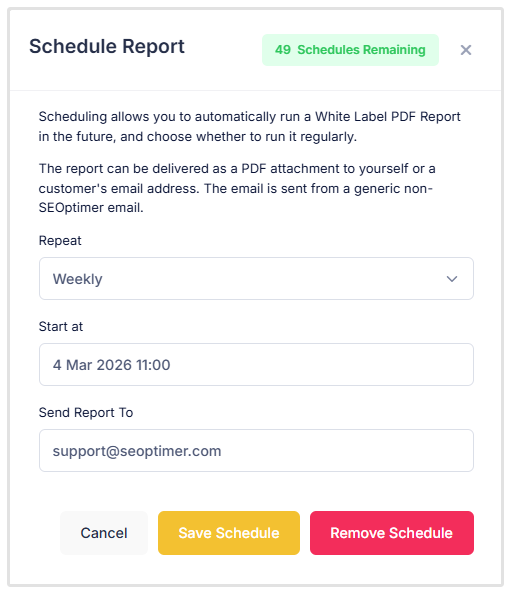
With this feature, our system automatically runs the audit report for you and sends a copy of the pdf to an email address of your choice. You can choose to schedule a once off audit, a weekly audit, or a monthly audit.
This feature is ideal for freelancers or agencies who want to automate audit report delivery for long term customers who require weekly or monthly audit reports.
Note, this feature is only available for our White Label and White Label and Embedding customers.
Our White Label users can run up to 10 scheduled audits per month while White Label and Embedding users can run up to 50 scheduled audits per month.
Keep in mind that removing a scheduled audit doesn’t restore your scheduling credit, you will need to wait for your billing cycle to renew before you can replace your scheduled audit with another schedule.
Should you need more scheduled audits credits, please reach out to us via our Live Chat for a quote.
How to Schedule a White Label Report
To schedule a white labeled audit report you need to first navigate to your White Label Reports page.
.png)
Once the page has loaded, add the URL of the site you want to audit in the audit field. If you’d like to change the report template, add competitors, or add a target keyword, click on Options, fill out the details and click Add Report.
If you don’t want to add any of these options, simply click Add Report.
.png)
You’ll notice once you’ve added the report, the URL of the site will appear in the table below the audit field. As a side note, all audits run via the White Label Reports audit tool are stored on this page until you choose to delete them.
After you’ve added your audit report, click on the Options button followed by Schedule Report.

.png)
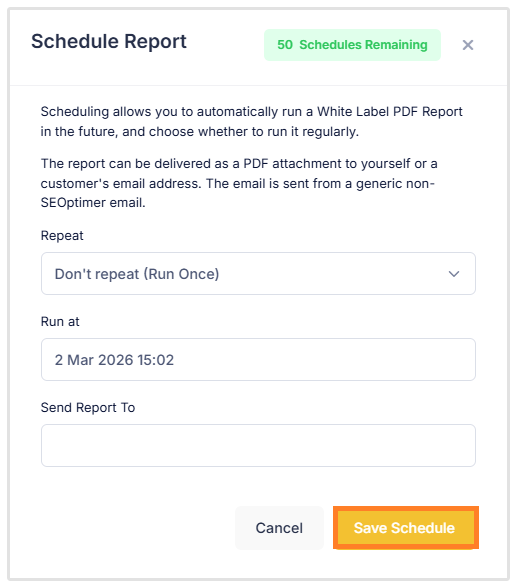
Here you’ll see that you have a few options.First you can choose how often to run the scheduled audit which includes only running it once, running it weekly, and running it monthly.
 (1).png)
Next, you can choose the date, time, and timezone you’d like the audits to run.
 (1).png)
And finally you can enter an email address to deliver the report to. Some of our customers prefer to send the pdf report to their own email while others choose to deliver the pdf report directly to their customer.
.png)
Finally, click Save Schedule.
Once you’ve saved your schedule you’ll see the date and time of the schedule appear under the Schedule column on your White Label Reports page.
.png)
You can change the details of your schedule at any time by clicking on Options, followed by Schedule. Always make sure to save your changes before closing the page.
How To Remove A Scheduled Audit
If you no longer want the scheduled audit to run, you can either remove the schedule by clicking on Options, Schedule and Remove Schedule, or you can click on Options and Delete to remove the report from your White Label Reports page entirely.
.png)
If you choose to remove the schedule using the Remove Schedule option, the audit will still be saved on your White Label Reports page.
Wrapping Up
Scheduled audit reports are a great way to automatically send your customers an audit on a weekly or monthly basis, reducing your workload, while also executing on your deliverables. If there are any features or tools you’d like us to add to SEOptimer, drop us a message, we’d love to hear from you.
Need Help?
Live Chat: Click Live Chat (bottom right)
Email: [email protected]
Response time: Within 24 hours

.png)